Registered Tables
A file that reaches the platform - a CSV, JSON-lines or Parquet file a person
uploaded as a managed resource, or one trino_export or a script wrote - can
be registered as a table on a Trino connection and joined to warehouse tables
from then on.
Nothing is copied. The registration creates an external table over the directory the file already sits in, so the table reads whatever the object holds now: a vendor drop that overwrites its file changes the query result on the next run with no further action. A new version of the file - a revision of a managed resource, an edit of an asset, a script's refresh - moves the table onto it as well, because a registration follows its file unless it was pinned.
What it is for
Getting a short list of outside keys into a report is otherwise awkward. Trino
has no client-side upload, and an agent emitting INSERT ... VALUES batches for
a fifty-thousand-row vendor CSV is slow and burns context. The join is the easy
part; loading is the gap.
A few hundred keys need no table at all - they join inline with
JOIN (VALUES ('a'),('b')) AS t(id) through trino_query on a read-only
connection. Registration is for the file that is too big for that.
What an operator has to configure
Registration is available on a Trino connection that names a scratch target, the catalog and schema registrations are written into, over a Hive catalog that reads the store the file is in. Every requirement that connection and catalog have is on one page: Scratch Catalog.
Registering
In the portal. Open a CSV, JSON-lines or Parquet resource or asset. A Query as a table section offers the connections you can reach that can hold one, and shows what is already registered with the columns each table has.
From a session. manage_table carries three actions, on either kind of
stored file:
manage_table action=register   reference=mcp:resource:... connection=scratch
manage_table action=register   reference=mcp:resource:... connection=scratch follow=false
manage_table action=register   reference=mcp:resource:... connection=scratch repair=true
manage_table action=list       reference=mcp:asset:...
manage_table action=unregister registration_id=...
reference is the string a search hit or a fetch document carries, passed
verbatim: mcp:resource:<id> for material somebody uploaded, mcp:asset:<id>
for a saved asset. The kind travels inside the reference, so one action serves
both and there is no argument naming which is which. table_name is optional;
the default is a slug of the file's name. follow defaults to true: the table
is moved onto each new revision or version written over the file. follow=false
is what the second call above adds: it pins the table to the version of the
file it is registered over, for a report that must keep returning the same
rows until somebody registers it again. See
Following the file. repair is what the third call
adds: it saves a corrected version of a file that cannot be read as a table the
way it is stored, and registers that. See
A CSV a query engine cannot read.
A reference that names no file you may register - one that does not exist, one that was deleted, one belonging to somebody else - is answered the same way in every case, so the tool cannot be used to find out which files exist.
Over REST.
GET    /api/v1/table-connections
GET    /api/v1/resources/{id}/tables
POST   /api/v1/resources/{id}/tables       {"connection": "scratch", "table_name": "vendor_keys", "follow": true, "repair": false}
DELETE /api/v1/resources/{id}/tables/{registrationID}
GET    /api/v1/portal/assets/{id}/tables
POST   /api/v1/portal/assets/{id}/tables
DELETE /api/v1/portal/assets/{id}/tables/{registrationID}
Finding what is registered
Two views, and the three words for them
A registration is read for one of two reasons, and the platform answers each under its own key.
| you want to | key | carried by | each row is |
|---|---|---|---|
| query the file | tables |
a fetch document, a search hit (as one table) |
connection, query_table, columns, sample_sql, and the stale / follow_error that say whether to trust the answer |
| change a registration | table_registrations |
manage_table action=list, manage_resource action=delete on a refusal, the per-file REST route |
the same, plus the id an unregister takes, registered_by, follow, repair and repaired |
The columns are on the document and not on the hit. A hit is a pointer chosen from a ranked page of them, and a page each carrying a wide table's column list is a large answer to the question of which record to read.
The two tools name the registration registration_id and give the columns as
plain names. The REST route answers under the same key with the stored record's
own field names, so there the id is id and each column is a {name, type}
object.
A third key, table_changes, is not a list of tables at all. It is one
sentence per table saying what a write just did to it, and it is carried by
every surface that writes over a file: manage_resource replace_content, the
manage_asset content edits, the portal and admin content routes, a script's
export record, and the run log. The same sentences are appended to that
result's message. See Following the file.
Reading tables off a manage_table action=list result is the mistake this
vocabulary exists to prevent: it used to answer under registrations while
every other surface said tables, so a script checking for an existing
registration found nothing and registered again on every run, changing the
registration id each time while the table itself survived.
Scratch Tables
The scratch schema is shared: everyone granted the connection sees every table in it. So the question "what is registered here" is one a reader has to be able to ask of the platform rather than of one file at a time.
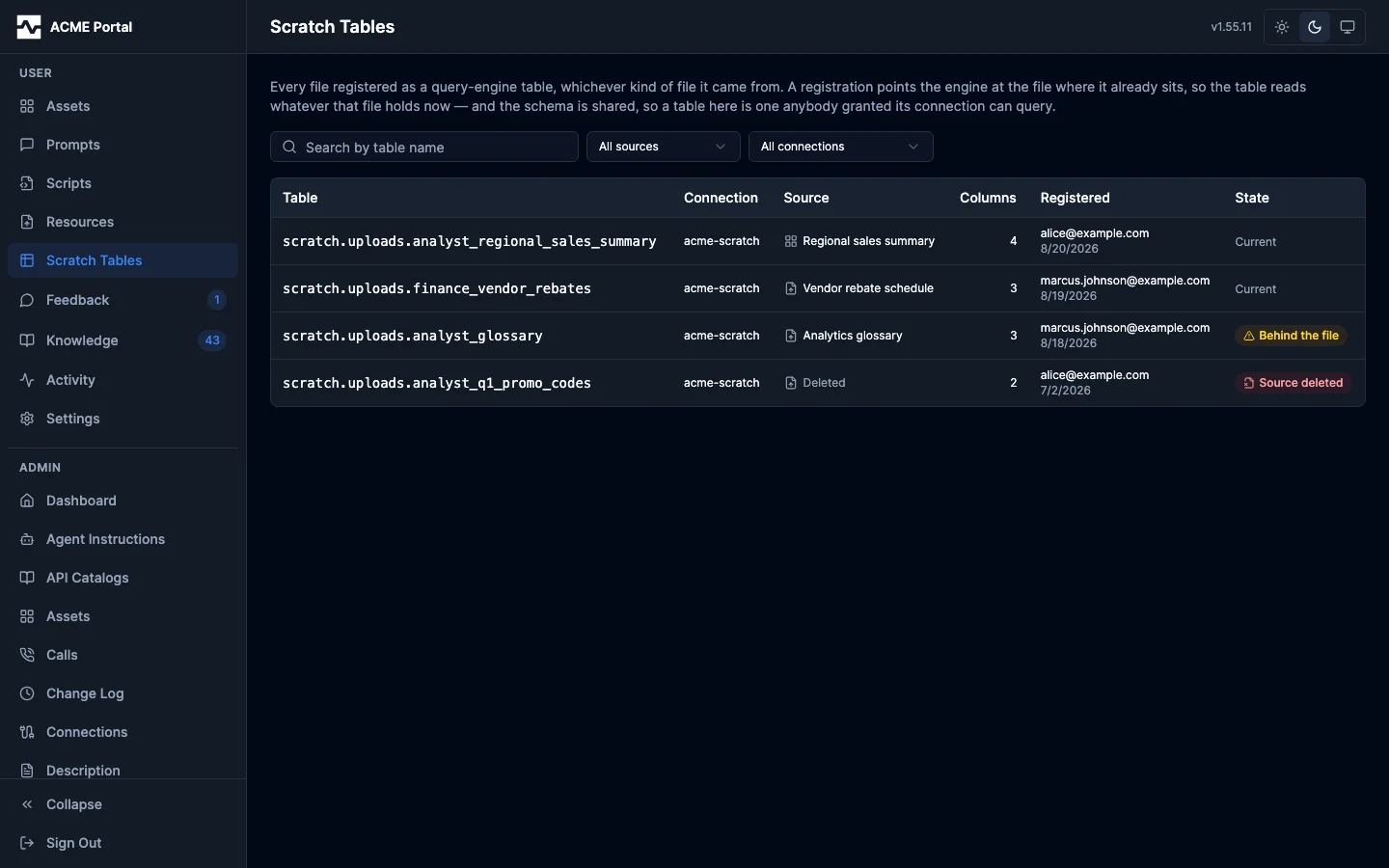
Scratch Tables, in the portal's own section list, answers that. One list of
every registration, whichever kind of file each was built over: the qualified
name to write in a FROM clause, the connection it lives on, the file behind
it, how many columns it has, who registered it and when, and whether it is
still reading that file's current contents.
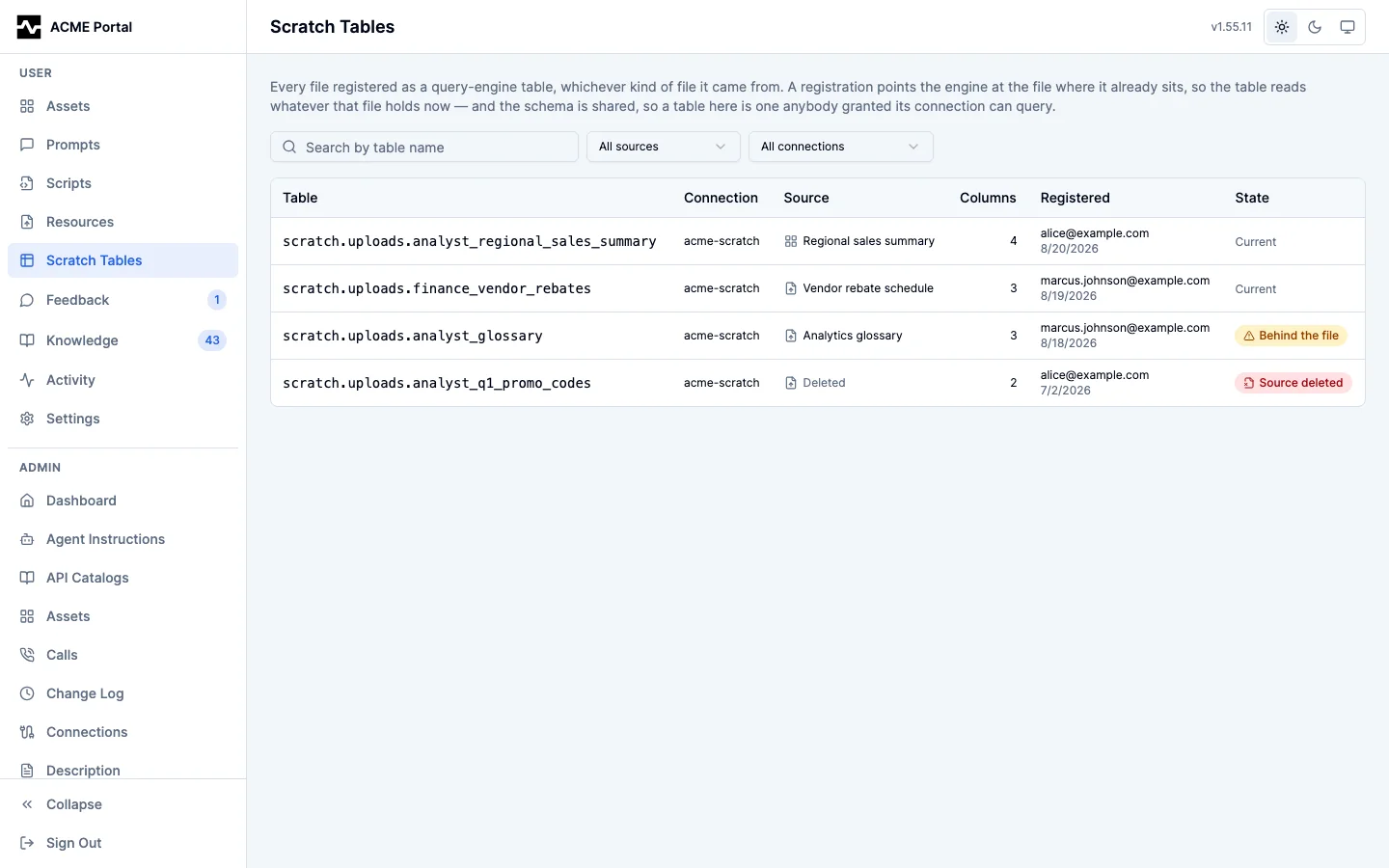
What you see is decided by the connection, which is the boundary Trino itself applies: the registrations on connections your persona is granted, and an administrator sees all of them. It is deliberately wider than the register form's connection list, which narrows further to connections that can hold a new table. A connection turned read-only after a registration would otherwise drop that table out of the list for the person who made it, while the engine went on answering queries against it.
The state column says which rule each table is under and whether it is keeping to it. Follows the file is the ordinary registration: each new version written over the file moves the table onto it. Pinned is a registration made with follow off, which stays on the version it was registered over until somebody registers it again. Two exceptions are called out because nothing else can report them. Behind the file is a registration whose source has a newer revision or version than the table points at: a pinned one by design, or a following one whose last follow could not move it, in which case the reason is on the registration. Source deleted is a registration whose file is no longer on the platform; deleting a file unregisters its tables, so this is the residue of a cleanup that did not complete.
Opening a row opens the registration at an address of its own: the sample statement with the cast a join needs, the columns with their types, the file it came from, and the directory it reads.
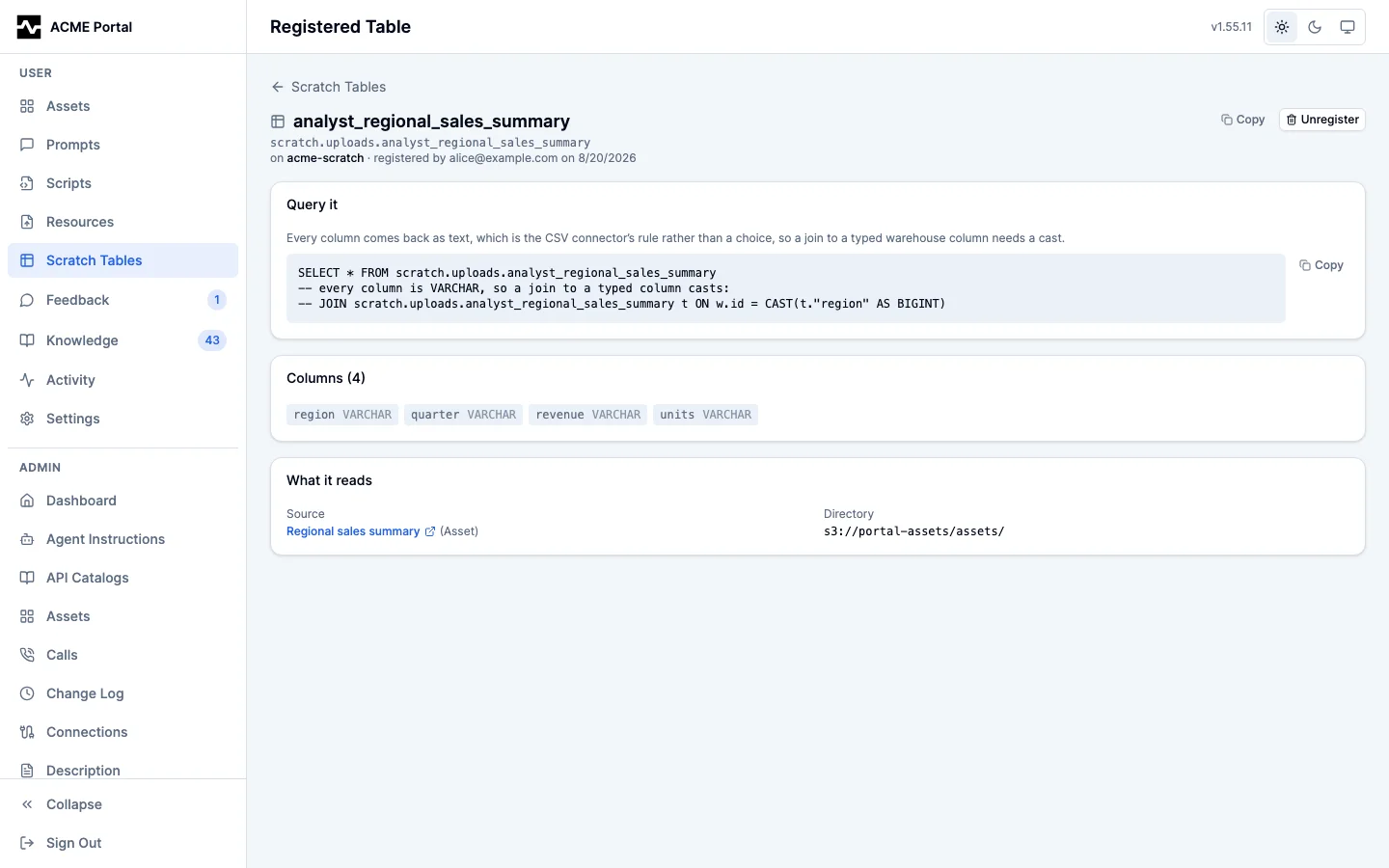
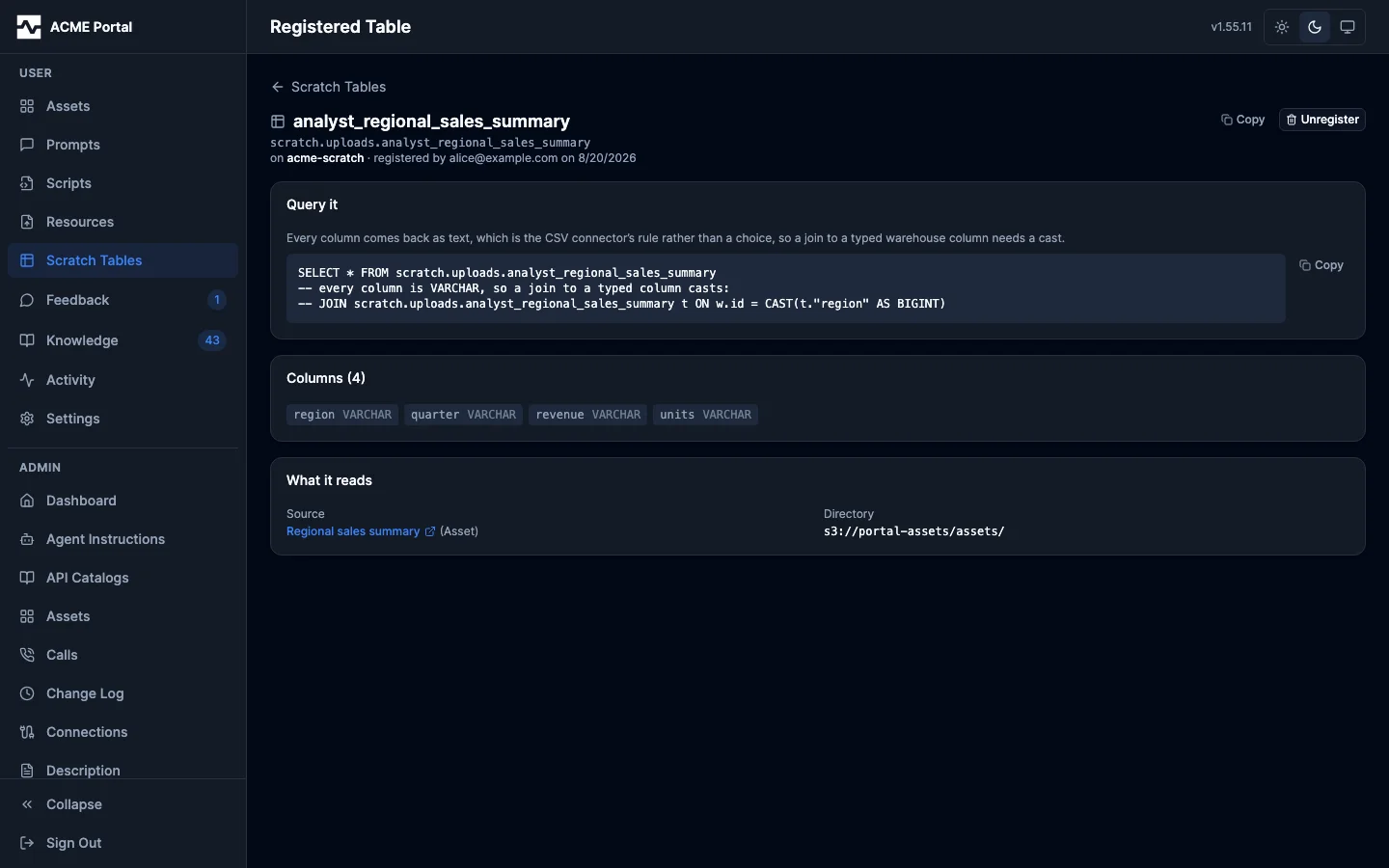
Unregistering is offered here on the tables you may drop, which is the rule the per-file panel applies: authority over the file, and having registered the table yourself or being an administrator. Registering stays on the file's own page, because it needs the file - the platform reads the header row to learn the columns.
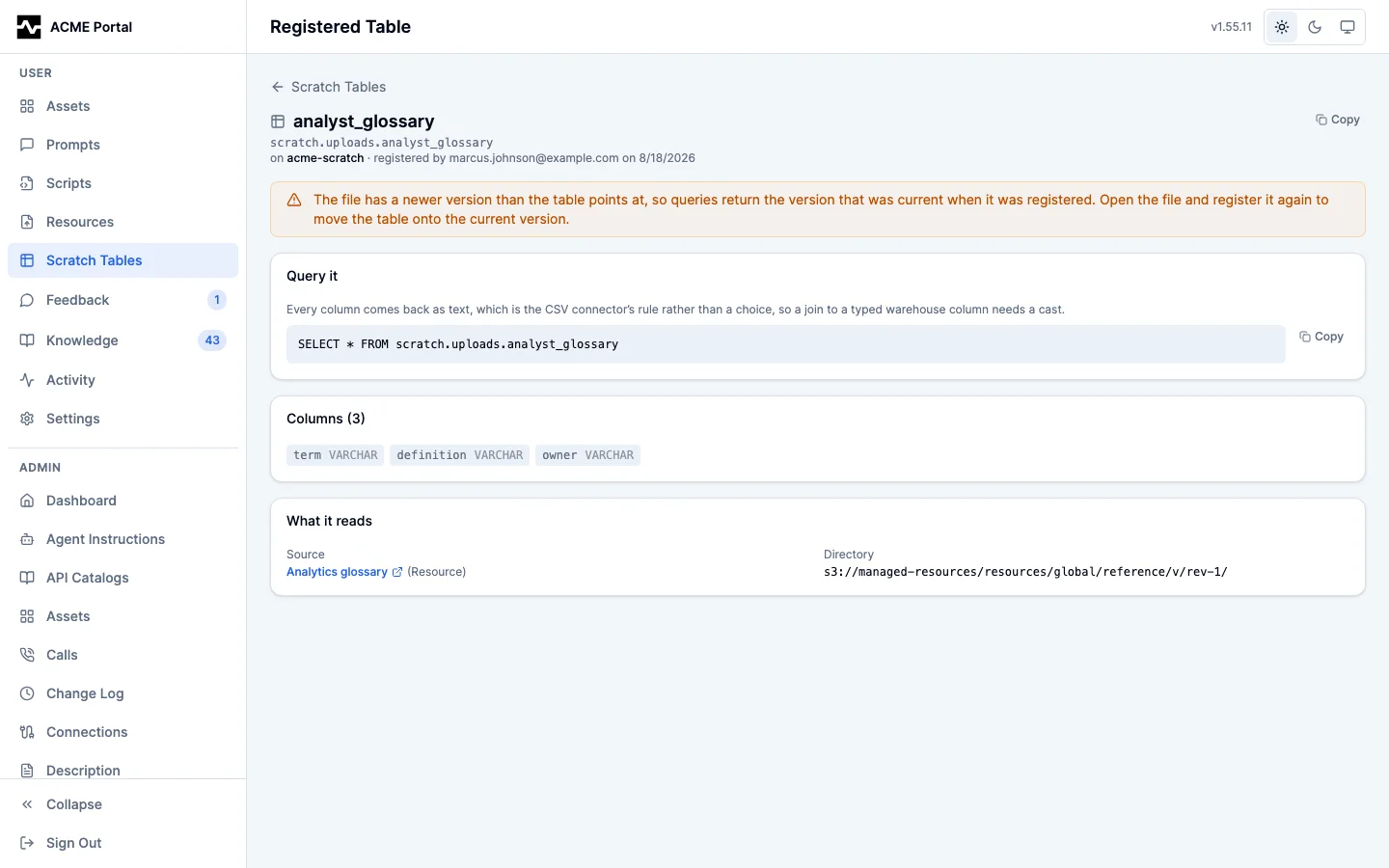
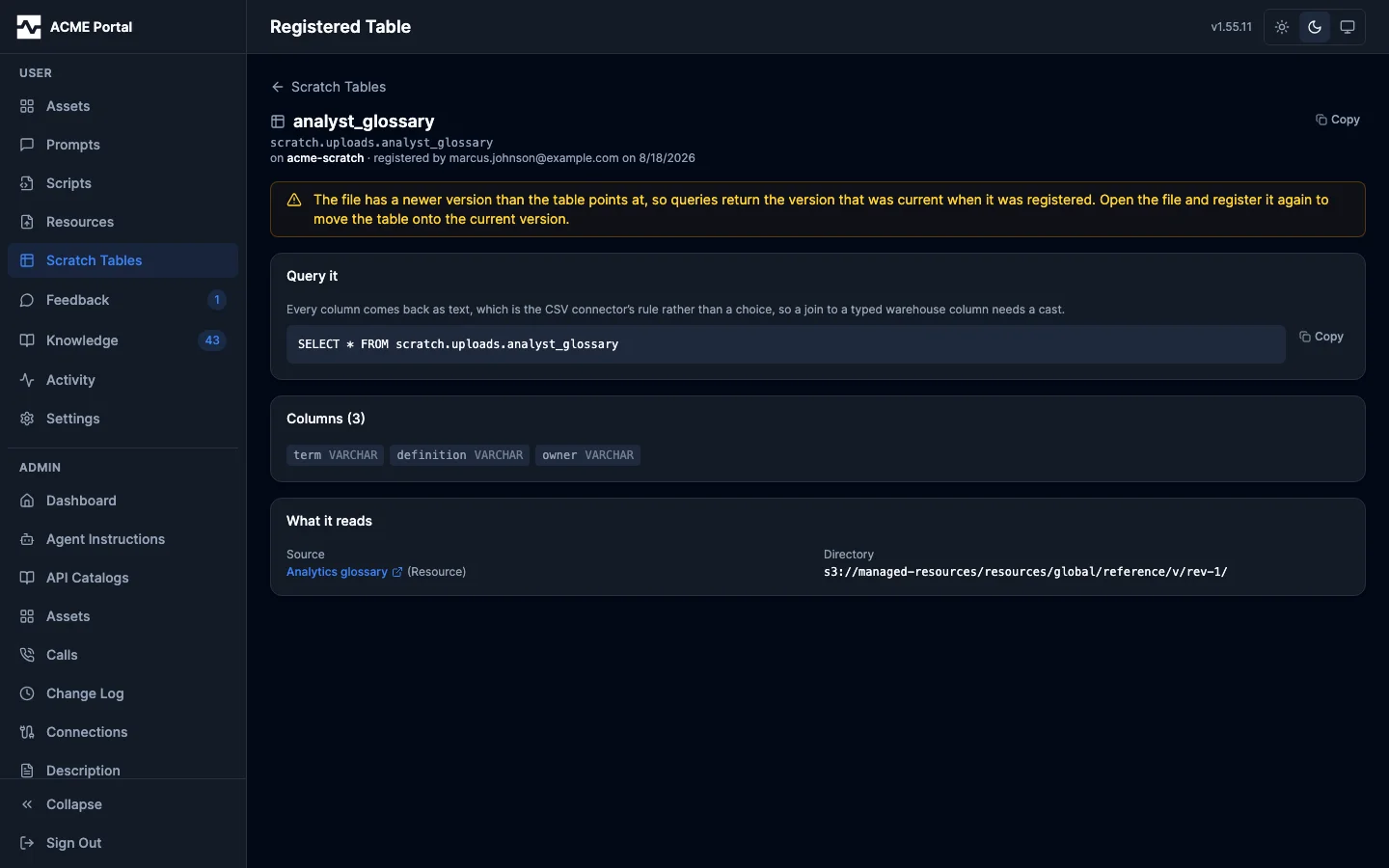
A table that follows its file and could not be moved says why, on the row and on its own page, until it is registered again.
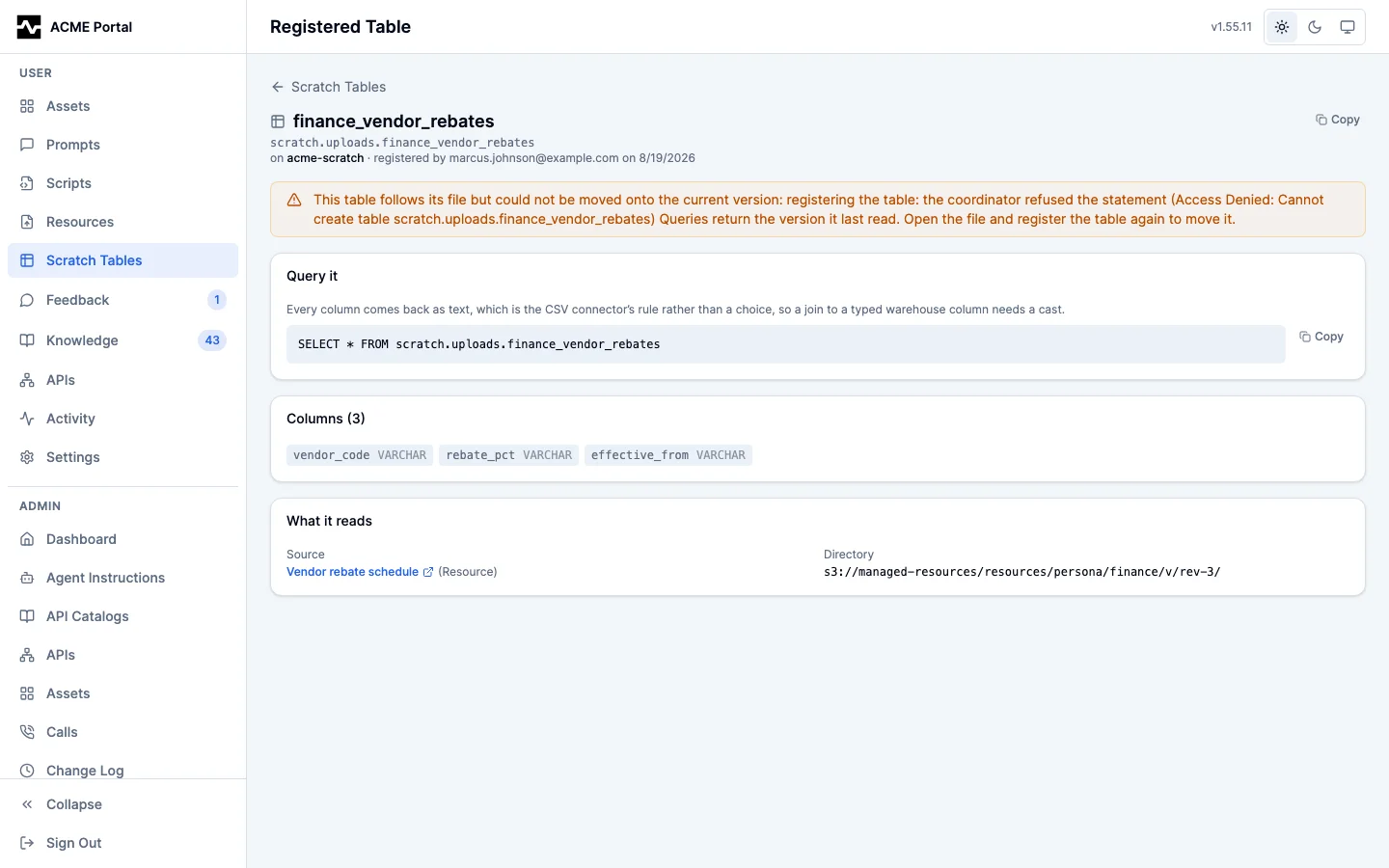
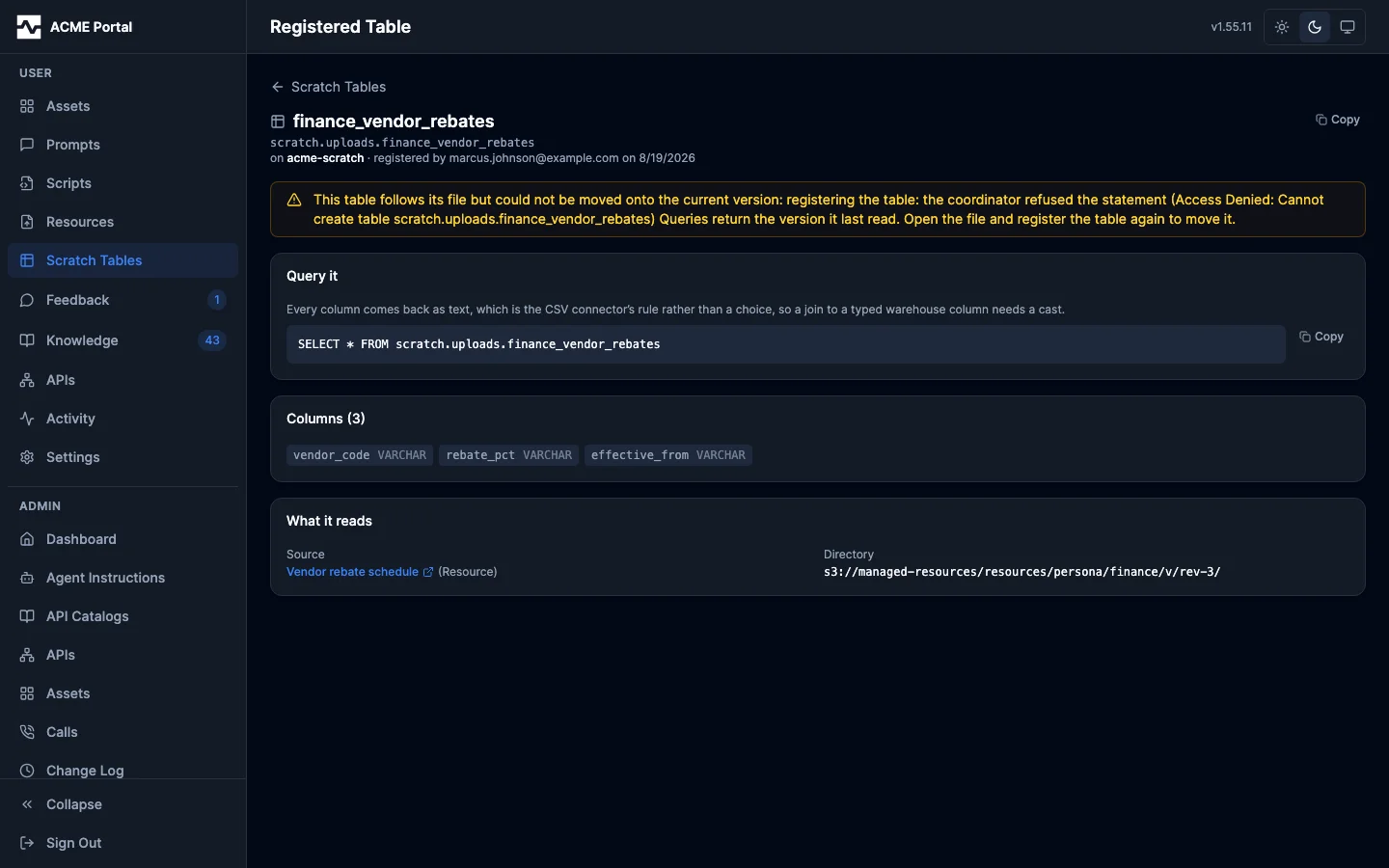
The listing is driven by the stored registrations rather than by what can be registered, so a source of a format the register action does not yet accept appears here as soon as one exists.
kind is resource or asset; q matches the qualified name. A registration
on a connection you do not reach answers 404, the same as one that does not
exist.
The lifecycle
Registration is a pointer and a name, not an import. Six things can happen to one, and the portal's Query as a table panel is where four of them are done.
Register. Pick a connection and, optionally, a name. The platform reads the file's header for column names, creates the external table over the directory the file occupies, and records the registration.
A registration that fails partway leaves nothing describing something that is not there, in either direction, and the answer tells the caller to register again. A table whose row could not be written is dropped: nothing would list it, and registering the same file again would meet it in Trino and fail on a name already taken. A table still recorded by the registration it was replacing is dropped for the opposite reason -- it now reads the new file with the new columns while the row that survived goes on naming the old ones, and nothing marks that. And a replacement whose CREATE failed after its DROP had already run forgets the row of the registration it took over, because the table that row named is gone. A replacement whose DROP is the statement that failed changed nothing and is left exactly as it was.
Register again. The control stays available after the first registration, because a file is not limited to one. Registering again does one of two things, depending on the name:
- A different name, or the same name on a different connection, adds a second table over the same file. Both stay listed, both work, and neither knows about the other. This is how one CSV is queryable from two clusters, or under a name that reads better in one team's queries than another's.
- The same name on the same connection replaces the registration, provided it is a name you registered. This is the repair for staleness below, and it is why the panel's warning says to register again rather than to unregister first. A name somebody else registered is refused and names who holds it, so nothing is silently overwritten; an administrator is unrestricted and does replace it.
Follow the file. A registration made with follow on - the default - is moved onto each new revision or version written over the file, by the write that produced it. See Following the file.
Correct the file. A registration made with repair saves a corrected
version of a file that cannot be read as a table the way it is stored, and
registers that version. A following one keeps doing it: each later version
carrying a defect of the same kind is corrected too. See Correcting the
file.
Go stale. A registration made with follow off stays on the version it was registered over, and a following one stays where it was when its last follow could not move it. The table keeps working; it is serving content that is no longer current, and the write that put it there said so.
Unregister. Drops the table and forgets the registration. The file is not touched: dropping a Hive external table removes the catalog entry and nothing else, and the object stays exactly where it was, byte for byte. Unregistering is the registrant's call or an administrator's.
Delete the file. Deleting the resource or asset drops every table registered over it, whoever registered them, and forgets the registrations.
CSV, JSON lines or Parquet
A registration reads its file through the reader its format names, decided by
the file's content type or, when that is generic, its extension (.csv;
.jsonl or .ndjson; .parquet). A .jsonl or .ndjson file typed
application/json is JSON lines too: one record on one line is also a JSON
document, and that is what detection calls it. The format is recorded on the
registration and shown as format wherever the registration is listed.
| CSV | JSON lines | Parquet | |
|---|---|---|---|
| Columns | The header line, cleaned: a blank name is filled in, a comma dropped, a repeat suffixed | Every key any record carries, lowercased, in the order first seen | The columns the file's footer declares, lowercased, in file order |
| Column types | Every column VARCHAR |
Inferred from every record (below) | The file's own (below) |
| A line break inside a value | Refused unless repair is set, and repair joins the value's lines with single spaces |
Carried exactly | Carried exactly |
| A null | Reads back as an empty string | Reads back as NULL | Reads back as NULL |
| What is read to register it | The whole file, within the read cap | The whole file, within the read cap | The footer only, by range, at any size |
Correction (repair) |
Offered for the defects listed below | Never; a defect is refused by line number. repair is accepted and does nothing |
Never; nothing to correct. repair is accepted and does nothing |
JSON lines and Parquet are the formats for values that must come back exactly:
trino_export and a script's platform.export both write them as
format=jsonl and format=parquet. A script can register the file it writes
in the same call; see
From rows to a table a query can read.
JSON lines
Every record is read, not a sample, and each key's type is inferred from all of its values, ignoring nulls and records that do not carry the key:
| The key's values | Declared as |
|---|---|
| All JSON booleans | BOOLEAN |
| All integers within the range of a 64-bit integer | BIGINT |
| Any number with a fraction or an exponent, alone or among integers | DOUBLE |
| All strings | VARCHAR |
A mix of scalar kinds (a number and a string), an integer too large for BIGINT, or nothing but nulls |
VARCHAR: the reader returns the text of a number or a boolean in a VARCHAR column |
| Objects | ROW over the union of their keys, each inferred the same way |
| Lists | ARRAY of what their elements infer to |
A fraction is a DOUBLE, not a DECIMAL: a JSON number carries no declared
scale, and one wide value would force a wide type on the whole column. No date
or timestamp is inferred from a string.
The JSON reader cannot read some line shapes, and a file holding one is refused
with its line number: a blank line anywhere but the end, a line that is not
exactly one JSON object (a second object on the same line would be dropped
without a word), and a key repeated in a record (keys match columns without
regard to case, so id and ID are one column). A key whose values cannot be
one type - an object on one line and a list or a scalar on another, or two
kinds of nested value inside one list - is refused naming the key and the line,
because no declaration reads both. A key must be ASCII, with no comma and no
leading or trailing space, because the reader leaves a non-ASCII key's column
empty and Hive refuses the others as column names. A key inside an object may
hold only letters, digits, _, ., $ and spaces: the metastore keeps a
nested type as Hive type text, whose parser admits nothing else, and a table
declared with any other nested name is created and then fails every statement
on it, its DROP included. A file with no records declares no columns and is
refused at registration; a later version of a following registration's file
that holds no records moves the table and keeps the columns it had, so a day
with nothing in it reads as zero rows.
A JSON-lines registration made before its columns were typed kept every column
VARCHAR, and keeps that rule when it follows its file, so the queries written
against it keep working (the registration row records it as all_varchar). A
new version with a nested value is refused for such a table, as it always was.
Registering the file again under the same name replaces it with a typed
registration.
Parquet
A Parquet file declares its own columns and types in its footer, at the end of the file, and a registration reads nothing else: the last bytes give the footer's length, one ranged read fetches it. A Parquet file larger than the cap a CSV is read whole under therefore registers. The file has to be one file in its own directory, as every registration's does; a directory of part files is not a table here.
| Parquet (physical / logical) | Declared as |
|---|---|
BOOLEAN |
BOOLEAN |
INT32 (no annotation, or INT(32,signed)) |
INTEGER |
INT32 INT(8,signed) / INT(16,signed) |
TINYINT / SMALLINT |
INT64 (no annotation, or INT(64,signed)) |
BIGINT |
INT32 INT(8,unsigned) / INT(16,unsigned) |
SMALLINT / INTEGER |
FLOAT / DOUBLE |
REAL / DOUBLE |
DECIMAL(p,s) on INT32, INT64, FIXED_LEN_BYTE_ARRAY or BYTE_ARRAY |
DECIMAL(p,s) |
BYTE_ARRAY STRING / ENUM / JSON |
VARCHAR |
BYTE_ARRAY with no annotation |
VARBINARY |
INT32 DATE |
DATE |
INT64 TIMESTAMP (millis, micros or nanos), INT96 |
TIMESTAMP(6) |
LIST |
ARRAY(element) |
MAP |
MAP(key, value) |
| a group | ROW(fields) |
A file written with only the older converted-type annotations (UTF8,
INT_8, TIMESTAMP_MILLIS, DECIMAL, ...) maps the same way. Anything else -
TIME, UUID, FLOAT16, INTERVAL, a plain FIXED_LEN_BYTE_ARRAY, a
repeated field outside a LIST or MAP, a DECIMAL wider than 38 digits - is
refused naming the column and its Parquet type, and no table is created: there
is no partial registration. So is an unsigned 32- or 64-bit integer, which has
no declaration that reads back exactly: a UINT32 of 4294967295 declared
BIGINT reads as -1, because the reader takes the physical INT32 as signed
whatever the column says, and a UINT64 declared DECIMAL(20,0), the only
type wide enough, is refused by the connector. So are two columns one apart by case (Id and
id), because the reader matches a Parquet column by name without regard to
case, and a field inside a group whose name the metastore cannot store (see
JSON lines). A timestamp is read at the catalog's precision,
which is why the catalog sets hive.timestamp-precision=MICROSECONDS (see
Scratch Catalog); a nanosecond timestamp reads back at
microseconds.
When a new version of a following Parquet file arrives, its footer is read
again and the table is declared again from it. An added, removed or retyped
column is reported in the write's table_changes, so a query that breaks on a
schema change is explained where the write reports what it did. A new version
that is not Parquet, or that holds a type the mapping refuses, sets
follow_error and leaves the table on the version it was on.
A CSV a query engine cannot read
Trino's Hive CSV reader is line-based: the text input format splits records on newlines before the quote-aware serde sees them. A line break inside a quoted cell therefore tears one record into several, the first fragment ends on an unbalanced quote, and every field after it lands in the wrong column.
This is the shape a spreadsheet export takes whenever one cell holds a multi-line value - an address, a note, a pasted paragraph. Such a file parses perfectly under every ordinary CSV reader, so nothing about it looks wrong, and a table over it is created without error and answers queries with rows. The rows are fragments.
The same reader splits on the newline and on nothing else, so a file whose lines end in a bare carriage return - the classic Mac ending some spreadsheet exports still write - is one record to it: a table over that file has a single row holding the whole file, and it too is created and queried without error.
Registration therefore reads the whole file before it creates anything - it is already reading it for the header row - and refuses three things:
- Lines that end in a carriage return. The records that end in one are run together into a single row, and the refusal says what the lines end in. A Windows CRLF ending is not this: every reader on the path folds it to a newline, and it costs nothing.
- A line break inside a cell. The refusal says how many rows carry one and which columns they are in.
- Bytes that are not UTF-8. They reach every cell as replacement marks: a
cell reading
15%in the source arrives as15%followed by mojibake. A NUL byte is refused on the same ground even where the rest of the file is valid UTF-8, for the reason under Correcting the file below.
None of the three is refused silently and none leaves anything behind: no table is created and no registration is recorded.
A leading UTF-8 byte-order mark is not one of the three. It is dropped before
the file is read at all, because it is not an encoding declaration to any
reader here - it is the first bytes of the first field, and <mark>"Post ID"
parses as an unquoted field carrying a bare quote. Every export that quotes its
strings writes that shape, so a file leading with a mark registers like any
other, and the first column is named what the header calls it.
A backslash is an ordinary character. A registered table reads the file as
RFC 4180 CSV, the dialect every CSV the platform writes is in: a quote inside a
quoted cell is doubled, and nothing else is escaped. The Hive CSV reader's own
default escapes with a backslash, under which back\slash reads as backslash
and a quoted cell holding a backslash beside a quote reads as an empty string,
with the row and column counts intact. Registration therefore declares
csv_escape = U&'\0000', which is how that reader is told to escape nothing
(#1819). A table registered before this carries the reader's default until its
file gets a new version it follows, or until it is registered again under the
same name.
A record that ends before the header does is not a defect. Its trailing columns
are absent rather than wrong, and every reader of a CSV supplies them: Go's
encoding/csv and Python's csv return the short record, PapaParse fills the
missing keys, Excel and Preview open it, and the Hive CSV reader a registered
table is served by reads the values it finds and leaves the rest null. A
Facebook Insights export whose exporter omits two trailing columns for one post
type - 21 of its 178 records - registers, and those columns come back null for
those rows. What is refused is the other direction: a record carrying MORE
fields than the header cannot be trimmed to fit without losing a value the file
holds.
A comma in a heading does not survive into the column's name. The Hive
metastore stores a table's column list comma-separated, so the connector
refuses a name holding one whatever the quoting, and a heading like
Reactions, Comments and Shares would fail at the DDL — after a correction of
the file had already been written. Each comma becomes a space and the runs
collapse, the way a blank heading becomes column_3 and a repeated one is
suffixed. Every other character a spreadsheet puts in a heading is kept: a
space, a dot, a colon, a parenthesis, a slash, a semicolon, a percent and an
equals were each created without complaint on Trino 476.
A first line the reader cannot parse at all is refused, and the refusal carries the parse error. It is not "the file has no header row": a file with nothing in it has no header row, and a file whose first line could not be read has one (#1774).
A registration that could not be completed for a reason that is the platform's rather than the file's - a store that stopped answering, a coordinator that would not run the statement - says which of those it was, naming the stage it stopped at. The whole error, which may carry addresses and topology a caller should not see, goes to the audit trail and the server log instead. Every failed registration writes an audit event, whether it was refused or failed, carrying the caller, the connection, the file and that error (#1775).
The line endings are settled before the rest of the file is read, so a refusal counts the records the file holds and names the columns it declares, rather than the single record a reader that splits on the newline alone found in it. Which carriage returns were line endings is decided from the parse rather than from the bytes: a lone carriage return is translated, and the translation is kept only where it recovers records the reader could not see. What counts as recovered depends on what the file already is.
A file with no newline anywhere is one record to every reader on this path, and no ordinary CSV is written that way - a file that ends its records with newlines has newlines in it. Nothing about it is ambiguous, so any record the translation recovers is a record the file holds. This includes a classic Mac file whose rows do not match its header: it is read as the several records it is, and then refused by the field-count check below, which is the honest answer where merging it into one row is not.
A file that already has newline-delimited records is the ambiguous one. A lone carriage return in it is as likely to be a break inside a cell, and splitting that cell adds a record exactly as a real line ending would. There the records are counted by the header's width, because a record recovered from a line ending has the columns the header declares and a fragment torn out of one cell does not. A carriage return that recovers nothing therefore stays what it is, a line break inside a cell, and nothing untrue is said about the file's lines - except in the one shape below, where the two readings cannot be told apart at all.
One shape stays ambiguous and is decided rather than known: a single-column file with an unquoted carriage return in a value. Every fragment of a one-column record has the header's width, so field counts cannot separate the two readings, and the carriage return is taken as a line ending. The correction says what it did and the version before it is still there. A spreadsheet writing a multi-line value into a one-column file quotes it, and a quoted one is read as the cell break it is.
Correcting the file
The refusal offers the correction, and taking it is one control in the portal
or repair=true on the tool call. What it does is a decode and a re-emit:
- the bytes are read as UTF-8, or as windows-1252 when they are not valid UTF-8, and a leading byte-order mark is dropped
- a carriage-return line ending becomes a newline, so each record is on its own line
- each run of line breaks inside a cell becomes a single space, and the cell is trimmed
- the file is written back out as UTF-8 CSV with no byte-order mark
The result is a new version of the file itself, written through the version trail its kind already has: a revision for a managed resource, a version for a portal asset. Nothing is copied to a second object beside the original, no mirror is kept, and the file as it was uploaded stays as the version before the correction - visible in the version panel and restorable from it. The registration is then built over the new version's directory, so the table is current from the moment it exists.
The result says what changed, in the portal and in the tool's answer, because the person's file changed. The same sentence is recorded on the version the correction wrote, for either kind, so the version panel says why the file changed without a reader having to find the registration that did it.
The choice is kept on the registration. A source that produces the same
defect every time it runs - a weekly spreadsheet export, a script writing a CSV
whose text fields carry paragraph breaks - would otherwise correct cleanly on
the day somebody registered it and stop on every version after that. So
repair is recorded on the registration, and a table that follows its file
corrects each new version the same way: see Correcting the file as it
follows. It only does anything for a
following table, since a pinned one is never moved onto a new version and so
never meets one to correct. The registration that is current holds the choice:
registering the same name again without asking for the correction leaves a
table that corrects nothing.
A file the correction cannot put right is refused once, and no correction is offered for it. Two things put a file there. A record whose field count differs from the header's is one: filling in a short record invents data and dropping a field from a long one loses some, and neither is a correction the platform can make on somebody's behalf. A file the reader cannot parse all the way through is the other: the correction rewrites every record, so it cannot be made over records it cannot read. Both are settled by the same read of the file that found the defect, so the refusal names the field counts, or the parse error, the first time it answers - rather than offering a correction that would then decline with a different problem. Either way the file has to be fixed where it was written.
Neither condition refuses a file on its own. A ragged CSV whose lines end in newlines and whose cells hold no line break registers as it always has, and so does one the reader gives up on partway: nothing here changes what happens to them.
Only a single-byte code page is converted. A spreadsheet's Unicode Text export is UTF-16, and every byte of a UTF-16 file is also a valid windows-1252 character, so reading one as a code page produces a character per byte - mojibake in every cell. A file whose bytes carry a UTF-16 or UTF-32 byte-order mark, or a NUL byte, is therefore refused outright and no correction is offered for it: re-export it as UTF-8 CSV and upload that. Nothing is offered that the platform cannot honestly do.
Nor is every file that is not UTF-8 a windows-1252 one. That code page leaves
five of its 256 byte values with no character at all - 0x81, 0x8D, 0x8F,
0x90 and 0x9D - and a decoder asked to read one of them puts a replacement
mark in its place and reports no error. A file holding one is in some other
encoding, or is not text; converting it would write those marks into the
person's new version and call it a conversion from windows-1252. So the code
page is the answer only where every byte is one it defines, and a file carrying
any of the five is refused with the same instruction: re-export it as UTF-8 CSV
and upload that. The bytes on either side of them - 0x80, 0x8E, 0x9E and
0x9F - all have characters and still convert.
The NUL byte is looked for before the UTF-8 check rather than after it, because a NUL is itself valid UTF-8. The same Unicode Text export written without a byte-order mark, over content that is plain ASCII, is a valid UTF-8 file with a NUL beside every character; a UTF-8 check alone passes it, and the table it would register carries those NULs in its column names and in every cell.
Such a file is then reported on its encoding alone. The refusal says nothing about its line endings, how many of its rows are torn, or what its columns are called, because each of those readings would be taken from bytes read in the wrong encoding: a Windows line ending in a UTF-16 file puts a carriage return beside a NUL, which a reader of single-byte text takes for a line break inside a cell, and the column it would name is the run of NUL-laden bytes around it rather than a name the file holds.
Where the NUL is what identified the file, the refusal names the NUL rather than an encoding, since nothing else about those bytes says what they are.
A correction is written before the last of the checks have run, so a refusal - or a coordinator that would not run the statement - can arrive after the file has already changed. The answer says so in that case, and the audit event records the correction whether or not the registration it was for succeeded. The file stays corrected; registering it again creates the table.
A file that is already line-safe and valid UTF-8 with no NUL in it registers exactly as it always did. No version is written, nothing is rewritten, and the result says nothing extra - including when the correction was asked for and turned out to be unnecessary.
Following the file
A registration pins a directory: the directory the file's current version sat
in when the table was registered. Every revision of a managed resource and
every version of a portal asset writes the new content to a new directory and
moves the head, so a registration left alone would go on reading the version
that was current on the day it was made. A registration therefore follows
its file by default: the write that produces a new version moves every
following table over the file onto it, with the same statements a
re-registration runs - drop, create at the new directory, columns re-read from
the new version's header - under the same registrant, before the write
returns. From the moment replace_content, the asset editor, or a script's
platform.export answers, a query against the table reads the new contents. A
version whose header differs gives the table the new columns.
The write says what happened to every table over the file. The result of
manage_resource replace_content, of manage_asset content edits and
reverts, of the portal's and the admin console's content routes, and of a
script's platform.export carries table_changes, one sentence per
registered table:
scratch.uploads.analyst_stores on scratch now reads version 7. for a table
that followed, or ... is pinned to the version it was registered over and is
now behind this file; register it again to move it ... for one that is not.
The sentences are appended to the result's message as well. A managed
script's run log carries them too, as table_changes: <output>: <sentence>,
so a scheduled run that put a table behind its file says so in its history.
The write is never failed by the follow. The file changed; that write succeeded. A follow the coordinator refuses leaves the registration where it was, with the reason recorded on it, so the table is behind the file exactly as a pinned one is and the listing says why. A create that fails after the drop ran puts the table back at its old directory first. A new version that cannot be read as a table - a second file in its directory, a CSV that needs correcting - is refused the way a registration would refuse it, and the registration is reported behind with that reason. A follow rewrites the person's file only where the registration was made asking for exactly that: see Correcting the file as it follows.
Pinning is the choice. follow=false on the tool, "follow": false in
the REST body, or the Follow the file box unticked in the portal registers a
table that stays on the version of the file it was registered over. That is
the right shape for a report that must keep returning the same rows until
somebody decides otherwise. The choice is stored on the registration, shown
as Pinned in Scratch Tables and on the registration's page, and re-settable
by registering the same name again.
Changing the file, then, is four cases:
| What happened | What the table does | What to do |
|---|---|---|
| The object is overwritten at the same key. A vendor drop replacing yesterday's file, a bucket destination a script writes to. | The next query returns the new contents. | Nothing. |
| A new version is written over a file whose table follows it. Every portal asset edit does this, as does every revision of a managed resource. | The table is moved onto the new version before the write returns, and the write's result names it. | Nothing. |
| A new version carrying a correctable defect is written over a file whose table follows it and corrects it. | A corrected version is saved above it, under the registrant, and the table is moved onto that. The write's result names the table and the correction. | Nothing. |
| A new version is written over a file whose table is pinned. | The table keeps serving the directory it was registered against. That is correct SQL over the version that was current when it was registered. The write's result says the table is behind. | Register again, same connection and name, when it should move. |
The last case, and a follow that could not be completed, are reported as
stale everywhere a registration is shown: in the portal panel, on a
search hit, in Scratch Tables, and in manage_table action=list. A stale
table is not broken and is not dropped, so a report built on it keeps running;
it is behind, and the platform will not move a pinned table forward on its
own.
A pinned table stays on one version because every version has a directory
of its own. A table reads every file in the directory it points at, so
pinning is only as good as that directory holding one version. A portal edit,
a resource revision, a script's platform.export and the export tools each
write a version as one file in a directory of its own: a script
output's versions sit at scripts/<script>/<asset>/<run>/content.<ext>, so
the next run's file lands beside nothing a table reads (#1851). Script outputs
written before that shared one directory per output, <asset>/<run>.<ext>. A
table pinned over one of those reads every version written into that
directory, and a later write says so in place of the pinned sentence -
... is pinned, but it does not read the version it was registered over alone:
earlier versions of this file were written into the directory it reads ...
-
rather than calling the table pinned to one version or followed. The files
are left where they are, since a report may depend on what it returns;
registering the table again points it at the current version, alone in its
own directory. Such an output's head, while every version still shares its
directory, is refused for a new registration naming the version beside it;
the script's next run writes a version that registers.
A managed resource cannot be overwritten in place: every replace_content is
a revision, which is what keeps a referenced file's history restorable. So a
managed script keeping a table current writes the
resource and lets the table follow, which is what a registration does unless
it was pinned. A bucket destination a script delivers to is the shape that
overwrites in place, and needs no registration to move.
Correcting the file as it follows
A table registered with repair corrects its file, and goes on correcting it.
When a new version arrives carrying a defect of the kind the correction can put
right - a carriage-return line ending, a line break inside a cell, a
windows-1252 code page - the follow saves a corrected version of the file
through the version trail its kind already has, and moves the table onto that
version. The version that carried the defect stays below it, exactly as the
uploaded bytes do after a register-with-repair: it is in the version panel, it
can be downloaded, and restoring it writes those bytes back as a new version.
Restoring it does not leave them as the file's head. A restore is a new version like any other, so the follow meets it, finds the same defect, and corrects it again - which is what the registration is for. To keep the defective bytes as what the file serves, register the table again without asking for the correction, or with follow off.
The corrected version is written under the registrant, not under whoever
made the write that triggered the follow, which is the identity a follow
already runs and is audited under. Its change summary is the same sentence a
register-with-repair records, so a person reading the file's history finds a
version nobody typed with the reason it appeared beside it. The write's result
says both halves: scratch.uploads.analyst_stores on scratch now reads version
7. Saved version 7 of this file, which put 94 rows back onto one line. ...
The registrant is an address, and that is all a registration keeps of them. So the corrected version records the registrant as its author, while what produced it is whatever the write that triggered the follow was produced by - the session or the script whose data the corrected version holds. Those are different questions with different answers, and the version panel and the provenance panel each show their own.
The file is corrected once for the version, not once per table over it. Where
more than one registration over the file carries the choice, one corrected
version is written - under the registrant of the oldest of them, the choice
that has stood over this file the longest - and every following table lands on
it, including any that did not ask for the correction: the corrected version is
the file's head, and a following table reads the head. The correction is
reported once, on the table whose registration the correction was made for -
the oldest one carrying the choice. A table registered without repair that
lands on the corrected version is told only that it moved, because it did not
ask for anybody's file to be rewritten.
What was refused stays refused. A defect the platform will not correct - a wide
encoding, a NUL byte, records that do not match the header, bytes the reader
cannot parse through - leaves the registration behind with the reason it gives
today, and no version is written. A registration made without repair is left
behind the same way, with the sentence offering the correction, because nobody
asked for its file to be rewritten. A pinned registration is not moved onto a
new version at all, so carrying the choice does nothing for it.
When a table disappears
A follow, an unregister and a replacing registration each run DROP TABLE.
Afterwards the write asks the connection whether every other registration on
it still holds its table, records the ones that do not (follow_error opens
with The table no longer exists), and says so: a follow reports it in the
table_changes sentences beside the tables it moved (<table> on <connection> no
longer exists: the table was removed while <other> was moved to version N.
Register it again to restore it.), a replacing registration in its result,
and an unregister on the registration rows the listing reads. A lookup the
connection cannot answer is logged, not reported, since a connection that
cannot answer has not said the table is gone. A table dropped outside the
platform is noticed by the next write that runs DDL on its connection.
The case this exists for is an object store whose prefix listing does not stop
at a directory boundary. Trino's file metastore drops a table by listing its
metadata directory, and such a store answers the listing for x/ with
x_pinned/... too, so dropping x takes x_pinned's metadata with it. A
deployment on a file metastore should run an object store that honors the
boundary (SeaweedFS before 4.17 does not); the check above is what keeps a
registration honest either way.
Querying what you registered
A CSV table's columns are all VARCHAR. That is the Hive CSV storage format's
rule, not a platform choice - declaring the table any other way is refused by
Trino itself - so a join to a typed warehouse column needs a cast:
SELECT s.store_id, s.store_name, u.rebate_pct
FROM warehouse.public.stores s
JOIN scratch.uploads.analyst_vendor_keys u
  ON s.store_id = CAST(u.store_id AS integer)
A JSON-lines or Parquet table's columns carry their types, so the same join
needs none, and a SUM over a BIGINT column is a SUM. The sample_sql a
registration reports follows the format: the cast and the sentence explaining
it for a CSV, the plain join for the others.
search carries a table reference on a hit for a registered file, and fetch
carries a tables list on the record: one entry per registration over the
file, newest first, each with the column names, their declared types as
column_types, a sample statement, and the same registration_id, follow, repair and follow_error
manage_table action=list reports under table_registrations. That is enough
to write the query without a second call. A file registered twice - on two connections, or registered again
after a header change - is two entries, and the document names both.
The hit carries one, without the columns, because a hit is a pointer to
somewhere the data can be queried rather than an inventory: it is the newest
registration whose follow_error is empty, so a hit never points at a table a
follow has already reported gone. A file whose every registration carries a follow error gets no
table on its hit, and its fetch document is where the reasons are.
Those are the same references manage_table takes, so finding a file and
registering it are one turn apart.
What is refused, and why
A directory holding a file Trino would read. Trino reads every non-hidden
object under an external location and parses it as CSV. A stray file beside the
content does not fail the query - it comes back as rows of that file's bytes.
Registration therefore refuses a directory with such a sibling and names it. A
name beginning with . or _ is hidden: Trino skips it, and so does the
check. The thumbnails the platform draws are written under those names, so a
CSV asset with a thumbnail registers with its thumbnails in place.
Thumbnails written before those names were adopted are stored as
thumbnail.png and thumbnail_dark.png - ordinary files that Trino does read,
so an asset still carrying them is refused. The platform draws such an asset
again for exactly this reason, under the hidden names, and removes the objects
the new tiles supersede, after which it registers. Nothing has to be run
against the bucket.
A file whose own name Trino skips. The same ./_ rule applies to the
file being registered. A table over a hidden object is created, recorded and
queried without any error and returns nothing, so a source under such a name is
refused and the reason is stated. Upload the file under another name.
A file that is not a CSV, JSON lines or Parquet. There is nothing to take column names from.
A JSON-lines file the JSON reader cannot read, or whose keys cannot each be one type. See JSON lines.
A file named or typed as Parquet whose bytes are not Parquet, one whose footer does not parse, and a Parquet file with a column no declaration reads back exactly. See Parquet.
A CSV a line-based reader cannot read. Lines that end in a carriage return rather than a newline, a line break inside a cell, or bytes that are not readable as UTF-8 text - which a NUL byte makes them, whether or not the rest of the file is valid UTF-8. See A CSV a query engine cannot read.
A file that is not yours. Registering is the authority to change the file,
not the authority to read it. An asset is registrable by its owner or an
administrator; a resource by its uploader, or by whoever may write to the scope
it lives in - a platform administrator, or the administrator of that persona.
That is the same rule that governs updating and deleting each kind, and it
holds on every surface: the portal panel, the REST routes and manage_table
resolve the file through one resolver per kind.
The rule is authority to change rather than authority to read because registering publishes the file's contents into a schema everyone granted the connection can read, and resource scopes are not carried into Trino. A read rule would let anyone who can see a persona-scoped file widen its audience.
A connection your persona is not granted. Registration meets the same connection boundary a tool call meets.
A read-only connection. The DDL runs through the same read-only check
trino_execute runs, so a connection with read_only: true refuses it.
Dropping a table you did not register. Unregistering is the registrant's call, or an administrator's: the table lives in a schema everyone with the connection shares, and the person who put it there is the one who takes it out. Deleting the file itself drops every table over it, whoever registered them.
A table name someone else registered. The scratch schema is shared, so the name is claimed on registration. Re-registering your own name replaces it; taking someone else's is refused, naming who holds it. Administrators are unrestricted.
What the scratch schema is
The scratch schema is a shared workspace. Everyone granted the connection can read every table in it, and resource and asset permissions are not carried into Trino - see the threat model.
Table names are prefixed with the registering person's persona. That is a
collision-avoidance measure and a legibility one, not a boundary: it keeps an
analyst's vendors apart from an administrator's, and it tells a reader of the
schema whose working table they are looking at.
The prefix separates personas rather than people, so two analysts registering
vendors do land on the same name, and the prefix is not what decides which of
them gets it. The name is claimed in a unique index on the connection, catalog,
schema and table, and the record of who registered it is what the platform
checks: re-registering a name you hold replaces the table, and a name somebody
else holds is refused rather than overwritten. Administrators are unrestricted,
so an administrator does replace another person's table.
What keeps a registration off the warehouse is the Trino identity the scratch connection authenticates as; see The Trino identities.
What is recorded
Every registration and unregistration writes an audit event: who, which connection, the statement that ran, and the table it named. Failed attempts are recorded too. A registration that corrected the file first records what the correction changed on the same event, because it rewrote somebody's file on their behalf - and it records it even when the registration went on to be refused, since the file changed either way.
Every follow writes a table_follow event under the registrant - the person
whose table moved, not the caller of the write that moved it - naming the
statements that ran, the version the table followed to, and the columns before
and after when the header changed. A follow that failed is recorded with the
failure, and so is the statement that put the table back.
Related
- Scratch Catalog - the connection and catalog a registration needs.
- Inbound Webhooks - sources whose events land as a table in the same catalog.
- Resources - uploading the files this registers.
- Authorization Model - why the Trino identity is the boundary.
- Threat Model - what the scratch schema exposes.