Admin API
The Admin REST API provides HTTP endpoints for managing the platform outside the MCP protocol. All endpoints are mounted under a configurable path prefix (default: /api/v1/admin).
Authentication
All admin endpoints require authentication. Pass credentials as either:
X-API-Key: <key>headerAuthorization: Bearer <token>header
The authenticated user must resolve to the configured admin persona (set via admin.persona in config). Requests without valid credentials receive 401 Unauthorized. Authenticated users whose persona does not match the admin persona receive 401 Unauthorized (the admin API is invisible to non-admin users by design).
Interactive API Documentation (Swagger UI)
When the admin API is enabled, an interactive Swagger UI is served at:
The OpenAPI specification is auto-generated from source code annotations using swaggo/swag. The raw spec is available at /api/v1/admin/docs/doc.json. To regenerate after code changes:
The portal's API types are generated from the same document converted to OpenAPI 3 (npm run generate-api-types), and swag can write a document that conversion refuses, such as a path parameter marked optional on a route that declares it. make apidocs-openapi3-check runs that conversion and fails on such a document; make verify and the CI frontend job both run it (#2022).
What the reference covers
The spec is not admin-only. Alongside the /api/v1/admin/* control plane it
documents the caller-facing surfaces a non-MCP client actually calls: the
API gateway data plane under
the Gateway tag (POST /api/v1/gateway/{connection}/invoke and
/invoke-raw, with their request body, the platform-versus-upstream status
split and the retry rules), the portal and resource routes, the portal catalog
surface (/api/v1/portal/catalog, see Platform Catalog),
and the table registrations. Operations are grouped into a User API
and an Admin API heading by x-tagGroups.
Two gates hold this together, because both failure modes were silent. A route
registered on a mux but carrying no annotations is caught by
TestAdminCatalogRouteParity, which reads every registration pattern in the
source tree and refuses one it cannot resolve statically rather than skipping
it. A tag used by an operation but missing from scripts/swagger-tag-groups.py
is caught by TestSwaggerTagsAreDescribedAndGrouped, since such a tag renders
as an untitled bucket outside both headings.
The landing section
info.description is the reference's introduction, and ReDoc splits it on its
top-level headings into navigation entries of their own: Getting started (the
base URL and one complete request with its response), Authentication, Calling a
connection through the gateway, Conventions (paging, the RFC 9457 error body,
the platform-versus-upstream status split, and the X-Platform-Instance
response header), and where the MCP surface is for a reader who wanted that one.
It is authored in internal/apidocs/introduction.md and injected by
scripts/swagger-tag-groups.py alongside the tag descriptions, because prose of
that length does not belong in a Go comment. The same script gives each
securityDefinitions entry its description, so an operation's Authorizations
block says what each credential is and where one is obtained rather than naming
two schemes.
The base URL the document names
@host in the annotations is localhost:8080, and the embedded document keeps
it: that is the loopback address the platform-admin self-connection reaches the
platform on. The copy served over HTTP names the origin it was served from
instead, since a reader always fetches the document over the origin it
describes. A Host that is not a host is ignored rather than reflected.
Reading it as reference material
The same document is also rendered with ReDoc, whose three-column layout suits
reading over trying calls out. Swagger UI keeps the "Try it out" button for an
operator holding an API key. Both are reachable from the portal's admin
navigation, and the caller-facing operation browser links
to the Gateway tag beside the call it hands you.
ReDoc is themed from the portal's own palette
(ui/src/pages/api-reference/redocTheme.ts), with one stylesheet
(redoc.css) for the components ReDoc styles with a literal rather than a
theme key. What holds it is a contrast sweep in
ui/e2e/interactive/api-reference.spec.ts: it walks every element of the
rendered document on both themes, resolves the background each one's text
actually sits on, and fails on any pair below WCAG AA for its size. A renderer
the portal embeds but does not style is checked over its whole surface or not at
all, so which routes the mock fixture carries is decided by which constructs the
served document contains.
Configuration
portal:
  enabled: true               # Enable portal SPA + API
  title: "ACME Data Platform" # Sidebar/branding title
  logo: https://example.com/logo.svg
  logo_light: https://example.com/logo-for-light-bg.svg
  logo_dark: https://example.com/logo-for-dark-bg.svg

admin:
  enabled: true
  persona: admin              # Persona required for admin access
  path_prefix: /api/v1/admin  # URL prefix for all admin endpoints
Admin configuration:
| Field | Type | Default | Description |
|---|---|---|---|
admin.enabled |
bool | false |
Enable admin REST API |
admin.persona |
string | admin |
Persona required for admin access |
admin.path_prefix |
string | /api/v1/admin |
URL prefix for admin endpoints |
Portal/branding configuration:
| Field | Type | Default | Description |
|---|---|---|---|
portal.enabled |
bool | false |
Enable portal SPA + API |
portal.title |
string | MCP Data Platform |
Sidebar/branding title text |
portal.logo |
string | "" |
Logo URL (fallback for both themes) |
portal.logo_light |
string | "" |
Logo URL for light theme |
portal.logo_dark |
string | "" |
Logo URL for dark theme |
portal.logo_email |
string | "" |
Raster PNG logo URL for notification emails (mail clients strip SVG); unset renders the brand wordmark alone |
Admin Portal
When portal.enabled: true, an interactive web dashboard is served at /portal/. The portal provides:
- Dashboard: Real-time platform health with activity timelines, top tools/users, performance percentiles, and error monitoring
- Tools: Connection overview, tool inventory with descriptions, and interactive tool execution with semantic enrichment display
- Audit Log: Searchable event log with detail drawer showing full request metadata and parameters
- Knowledge: Insight statistics, governance workflow with approve/reject actions, and changeset tracking
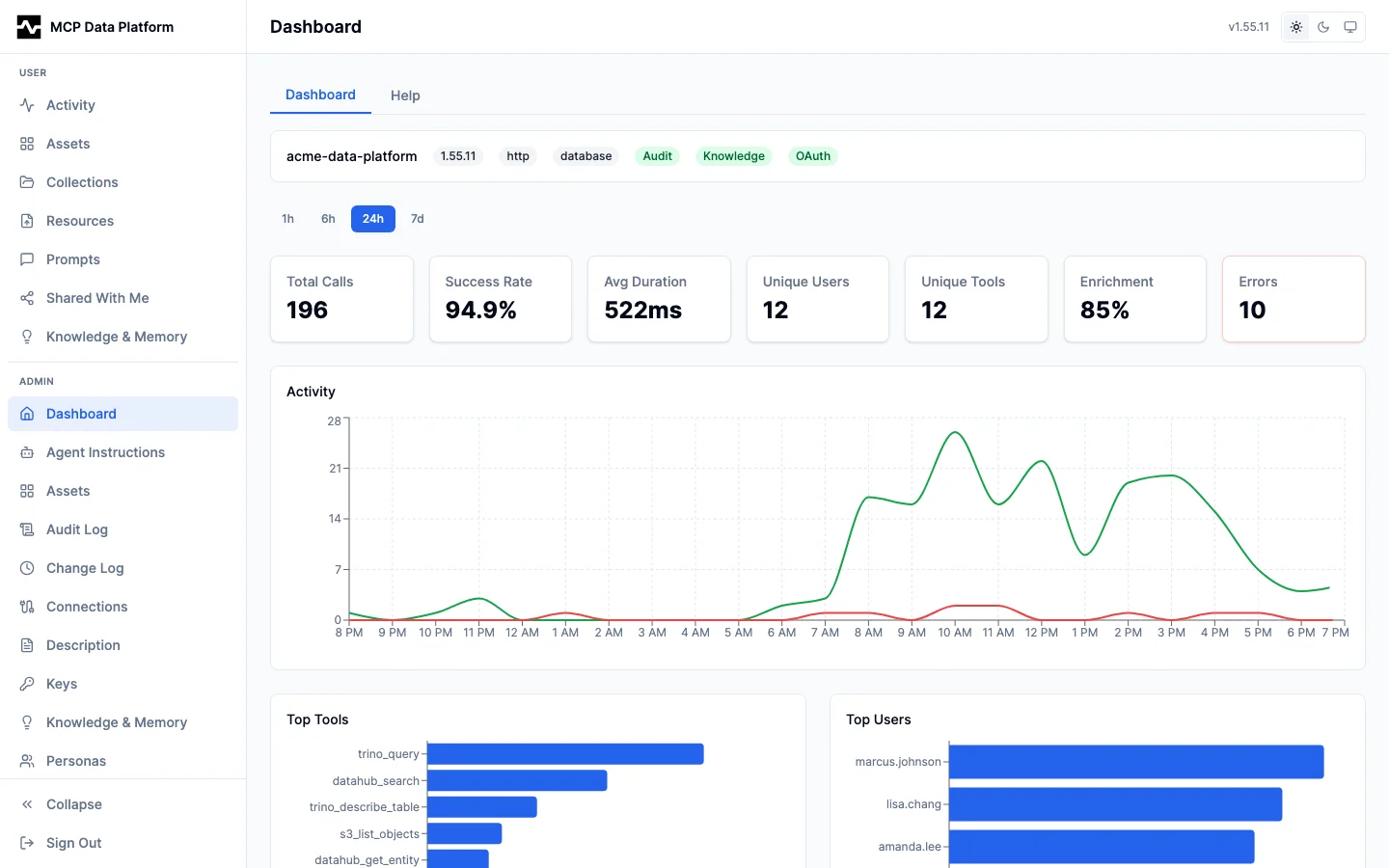
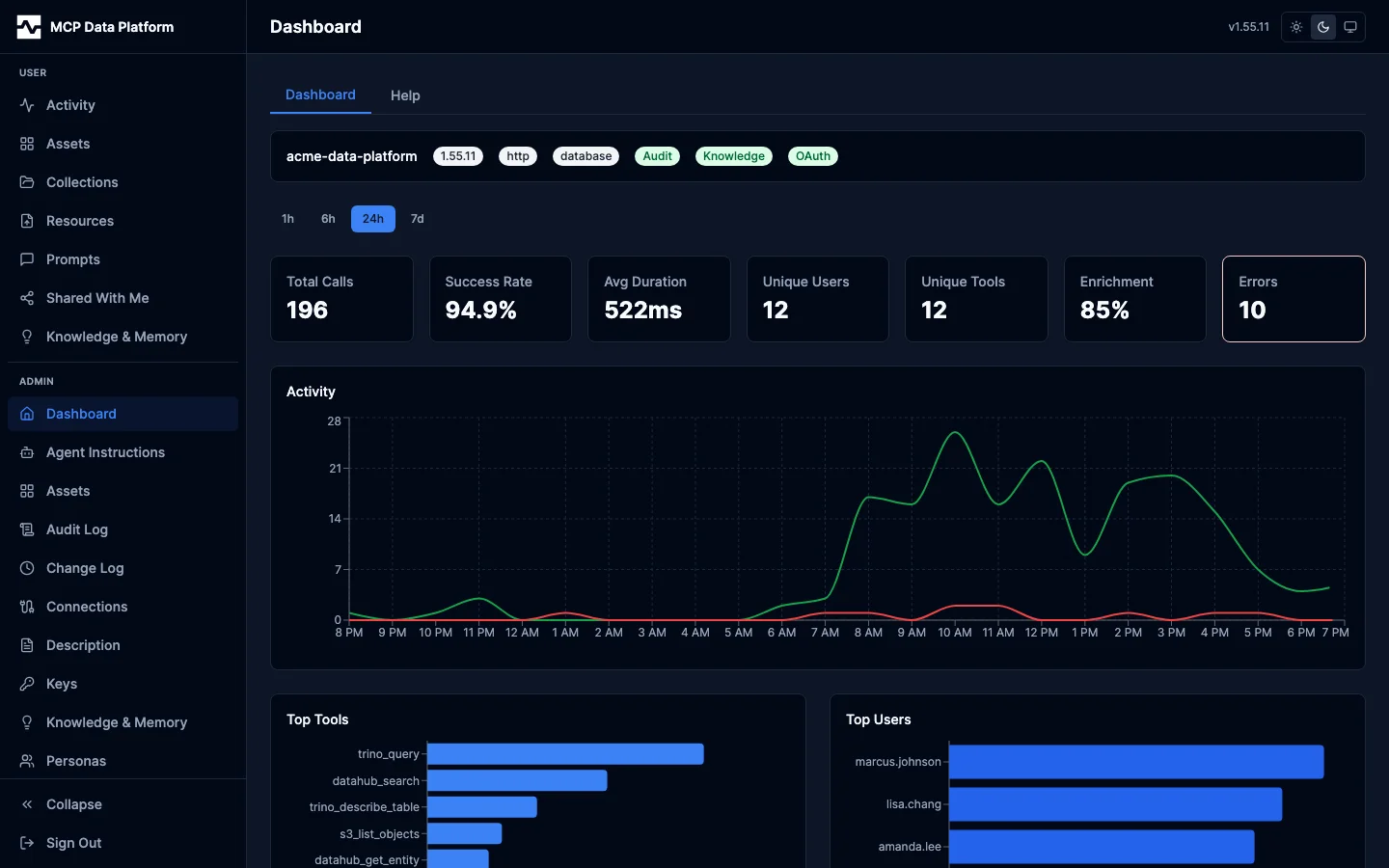
The portal requires authentication — access it with the same credentials used for admin API requests. In production builds, the service worker (mockServiceWorker.js) is stripped automatically.
See the Admin Portal guide for a complete visual walkthrough.
Empty Lists
A list field with nothing in it is [] in every response, never null (#1832).
Error Format
All errors follow RFC 9457 Problem Details:
{
  "type": "about:blank",
  "title": "Conflict",
  "status": 409,
  "detail": "knowledge is enabled but not available without database configuration"
}
Request Body Validation
Write endpoints decode JSON request bodies strictly: an unknown or mis-named
field is rejected with 400 Bad Request naming the offending field, rather than
being silently dropped. This prevents a typo from changing behavior: for
authorization-defining resources such as personas, a dropped deny_tools field
would otherwise create a more permissive persona than intended.
{
  "type": "about:blank",
  "title": "Bad Request",
  "status": 400,
  "detail": "unknown field \"tools\""
}
For example, POST /personas with the nested config shape
{"tools": {"allow": [...]}} is rejected because the documented fields are the
flat allow_tools/deny_tools; likewise POST /tools/call with arguments
(instead of the documented parameters) is rejected rather than executing the
tool with empty parameters.
Operating Mode Behavior
Some endpoints are only available in certain operating modes. When a feature is enabled in config but unavailable at runtime (e.g., no database), endpoints return 409 Conflict with an explanation. When a feature is disabled in config, endpoints return 404 Not Found.
| Endpoint Group | Standalone (no DB) | File + DB |
|---|---|---|
| System | available | available |
| Config (read) | available | available |
| Config entries (CRUD) | 409 | available (whitelisted keys only) |
| Config changelog | 409 | available |
| Personas (read) | available | available |
| Personas (write) | 409 | available |
| Auth keys (read) | available | available |
| Auth keys (write) | 409 | available |
| Audit | 409 (if enabled) | available |
| Knowledge | 409 (if enabled) | available |
System Endpoints
Get System Info
Returns platform identity, version, runtime feature availability, and config mode.
Response:
{
  "name": "mcp-data-platform",
  "version": "0.17.0",
  "description": "Semantic data platform",
  "transport": "http",
  "config_mode": "file",
  "portal_title": "ACME Data Platform",
  "portal_logo": "https://example.com/logo.svg",
  "portal_logo_light": "https://example.com/logo-for-light-bg.svg",
  "portal_logo_dark": "https://example.com/logo-for-dark-bg.svg",
  "features": {
    "audit": true,
    "oauth": false,
    "knowledge": true,
    "admin": true,
    "database": true
  },
  "toolkit_count": 3,
  "persona_count": 2
}
Feature booleans reflect runtime availability, not config values. For example, knowledge is false when enabled in config but no database is configured.
List Tools
Returns all registered tools across all toolkits.
Response:
{
  "tools": [
    {
      "name": "trino_query",
      "toolkit": "prod",
      "kind": "trino",
      "connection": "prod-trino"
    }
  ],
  "total": 1
}
List Connections
Returns all toolkit connections with their tools.
Response:
{
  "connections": [
    {
      "kind": "trino",
      "name": "prod",
      "connection": "prod-trino",
      "tools": ["trino_query", "trino_describe_table"]
    },
    {
      "kind": "mcp",
      "name": "vendor-crm",
      "connection": "vendor-crm",
      "tools": ["vendor-crm__search"],
      "health": {
        "reachable": false,
        "last_success": "2026-06-09T12:00:00Z",
        "last_error": "dial tcp: connection refused"
      }
    }
  ],
  "total": 2
}
The optional health object reports a gateway (mcp kind) upstream's runtime
reachability: reachable (live session with no failed last call),
last_success (RFC3339 UTC time of the last successful forwarded call, omitted
when none), and last_error (most recent call or connect failure). It is
present only for connection kinds that hold a live session and is the same
state the list_connections MCP tool reports, so the admin UI and the tool
never show conflicting health for the same connection. Kinds without
reachability tracking omit the field.
Index Jobs Endpoints
Cross-kind embedding-index health for every consumer of the shared index_jobs queue (pkg/indexjobs). These back the admin portal's Indexing dashboard. They degrade gracefully when no queue is wired (no database or no configured embedding provider): the read endpoints return the provider status with an empty kinds list rather than an error.
Top Callers
Who wrote the call catalog: up to ten callers (a principal under one persona) and ten personas, largest share first. Each carries its record count, its share of total (0 to 1), service_account (the persona is marked, so its new calls are not recorded) and excluded_by_config (the persona is named in calls.exclude_personas). The counts are at most five minutes old and are taken again after a sweep removes records; the two flags are read at the request. Registered only when the deployment keeps a database-backed call catalog.
{
  "total": 1426996,
  "principals": [
    { "user_id": "apikey:crm-sync", "persona": "integration", "records": 1419066, "share": 0.994, "service_account": false, "excluded_by_config": false }
  ],
  "personas": [
    { "persona": "integration", "records": 1419066, "share": 0.994, "service_account": false, "excluded_by_config": false }
  ],
  "counted_at": "2026-09-29T12:00:00Z"
}
Resource Search Indexing
How managed resources are indexed for search (#2111). GET counts the resources under each policy (full, metadata, none), how many of them a writer chose (explicit) rather than the resources.index rules, the bytes of extracted text kept for search (content_bytes), and the folders searchable as one entry (folders), with the last reclassification, whichever replica ran it (kept in resource_reclassify_runs):
{
  "counts": { "full": 412, "metadata": 1873, "none": 96, "explicit": 38, "content_bytes": 52428800, "folders": 14 },
  "last_run": {
    "started_at": "2026-10-12T15:00:00Z",
    "finished_at": "2026-10-12T15:01:00Z",
    "result": { "examined": 2381, "changed": 1204, "cleared": 1190 }
  }
}
POST starts a reclassification and answers 202 with its started_at: a walk over every resource that applies the rules again to each one no writer chose a policy for, in batches of 500 with a pause between them. A resource whose policy changes drops its vector and kept text and is re-indexed for what its new policy reads (changed); a resource under a policy that reads no content gives up any text it still kept (cleared). A policy a writer chose is never changed. It answers 409 while one runs on any replica. A run unfinished after an hour is taken to have stopped with its replica, so a later start is accepted. The admin portal's Indexing page shows both under Resource search. Registered only when the deployment has managed resources and a database.
Index Jobs Summary
Returns embedding-provider health plus one rollup row per registered kind: a plain-language health verdict, per-state unit counts, the number of units with open failures, last activity, and coverage where derivable.
Response:
{
  "provider": { "kind": "ollama", "model": "nomic-embed-text", "dimension": 768, "status": "ok" },
  "kinds": [
    {
      "kind": "api_catalog",
      "verdict": "degraded",
      "pending": 0, "running": 0, "succeeded": 6, "failed": 2, "retrying": 0,
      "last_activity": "2026-05-30T12:00:00Z",
      "coverage": { "indexed": 142, "expected": 168, "expected_known": true }
    },
    {
      "kind": "tools",
      "verdict": "indexing",
      "pending": 0, "running": 1, "succeeded": 1, "failed": 0, "retrying": 0,
      "last_activity": "2026-05-30T12:02:00Z",
      "coverage": { "indexed": 87, "expected": 0, "expected_known": false }
    }
  ]
}
verdict is one of healthy, indexing, or degraded, derived server-side from the same counts and coverage the response carries so the lead health word and the detail metrics can never disagree. healthy is the single resting state for any fully-indexed, quiescent, failure-free kind, whether or not it has job history (a kind whose vectors were seeded outside the queue simply has a null last_activity); recency is read from last_activity, not the verdict.
indexing requires queued work that is getting somewhere. A failed unit is re-queued, so a kind failing every unit the same way always carries a pending count, and the pending count alone would report a permanent total failure as a pass in flight. Two signals can argue that a kind is progressing, and either one is enough: more units resting on a success than carrying an open failure, or more persisted vectors than broken units (this second one survives a full re-enqueue, where an embedding-model swap makes every unit a gap at once and no unit rests on a success). Only when neither holds does queued work read degraded.
pending/running/succeeded are per-unit latest-status counts ("N units whose last run was X"), not job counts. failed is different in kind: it is the number of distinct units carrying an open failed job (status='failed' and not yet resolved), the same population GET /api/v1/admin/index-jobs/failures enumerates (that endpoint bounds how many it returns), so the count and the failure list can never disagree about what is open. A unit under retry is counted under both pending and failed; failed drops to zero once every failure is superseded by a later success or dismissed. retrying is the pending jobs waiting out a retry backoff (at least one attempt behind them), a subset of pending, counted over the whole table; the dashboard's Retry backoff panel shows it beside the first page of those jobs.
coverage.expected_known is true for the current kinds, so all render a real indexed/expected ratio. api-catalog's expected comes from its stamped operation_count; the tools kind writes its complete registered set atomically on each index, so its indexed vector count is also its expected count (reported as both halves of the ratio). A kind reports false only when it has no expected total to show, in which case the dashboard shows an indexed-only state.
Index Jobs List
Returns index_jobs rows newest first. All filters are optional; an omitted kind lists across every kind. status must be one of pending, running, succeeded, failed. retrying=true narrows to pending jobs with at least one attempt behind them, the jobs waiting out a retry backoff. limit defaults to 50 and is capped at 500.
A page of this list is the newest rows, so during a backlog it holds only pending jobs. The dashboard therefore asks it narrow questions (status=running for In flight, retrying=true for Retry backoff) and reads throughput and latency from the indexjob_* metrics (see Observability), not from a page of rows.
trigger reports what produced the row: write (the consumer's own write path enqueued it when the source row was created or its indexed text changed), reconciler (the periodic gap sweep), or manual_retry (the re-index escape hatch, which skips the worker's text-hash dedup).
Response:
{
  "jobs": [
    {
      "id": 105, "source_kind": "api_catalog", "source_id": "github|v3",
      "trigger": "reconciler", "status": "pending", "attempts": 2,
      "last_error": "embed batch: provider timeout after 30s",
      "next_run_at": "2026-05-30T12:03:30Z", "items_done": 0
    }
  ]
}
Re-index
Enqueues manual-retry jobs. With a source_id it targets exactly that unit (the failure-triage Retry button); without, it re-enqueues every unit the kind currently reports as out of sync. Enqueue is idempotent — a unit with an open job is not double-queued.
Request:
Response (202 Accepted):
Returns 404 for an unregistered kind and 409 when no queue is wired.
Failure Triage
Returns the units with open (unresolved) failures, one entry per unit, most-recently-failed first. A unit leaves this set automatically once a later job for the same (source_kind, source_id) succeeds (Complete resolves superseded failures), or when an operator dismisses it. Both filters are optional; an omitted kind lists across every kind. limit defaults to 50 and is capped at 500.
Response:
{
  "failures": [
    {
      "source_kind": "api_catalog", "source_id": "acme|v1",
      "latest_job_id": 106, "last_error": "embed batch: provider timeout after 30s on spec \"acme\"",
      "attempts": 5, "occurrences": 2,
      "first_failed_at": "2026-05-30T10:00:00Z", "last_failed_at": "2026-05-30T11:00:00Z",
      "last_succeeded_at": "2026-05-29T09:00:00Z",
      "parked_until": "2026-05-30T11:30:00Z"
    }
  ]
}
occurrences is how many open failed rows the unit has (>1 means it failed, was retried, and failed again without an intervening success). last_succeeded_at is omitted when the unit has never succeeded, so the dashboard can distinguish a unit that used to work from one that never has.
parked_until is present only while the periodic gap sweep is deferring the unit, and says when it will be re-queued. Each open failed row is five exhausted worker attempts, so a unit that reaches three of them is failing deterministically rather than transiently; the sweep then backs off instead of enqueueing a fresh job every ReconcilerInterval. The delay starts at 30 minutes, doubles with each further failure, and is capped at 6 hours.
The deferral is a delay, never a block. It applies to the automatic sweep alone: a write to the source row and the re-index escape hatch below both enqueue immediately, and because the cap is a bound rather than a terminal state, a unit whose cause has cleared recovers on its own without an operator touching it. That matters because this counter cannot distinguish a permanently unindexable input from a provider outage long enough to exhaust every unit in the corpus, and freezing the whole index behind the second case would be worse than the re-queue loop the deferral exists to stop.
Dismiss Failure
Resolves every open failed job for one unit, clearing it from the failure-triage surface. This is the explicit fallback for a failure that will never be superseded (for example a removed consumer's leftover rows, which auto-resolve cannot reach because no future job for the kind will succeed). Idempotent: dismissing an already-clean unit returns 200 with resolved: 0.
Request:
Response (200 OK):
Returns 400 when kind or source_id is missing and 409 when no queue is wired.
Config Endpoints
Get Config
Returns the current configuration as JSON with sensitive values redacted.
Response:
{
  "server": {
    "name": "mcp-data-platform",
    "transport": "http",
    "address": ":8080"
  },
  "auth": {
    "api_keys": {
      "enabled": true,
      "keys": [
        {
          "name": "admin",
          "key": "***REDACTED***",
          "roles": ["admin"]
        }
      ]
    }
  },
  "toolkits": [
    {
      "kind": "trino",
      "name": "prod",
      "config": {
        "host": "trino.example.com",
        "port": 8080,
        "password": "***REDACTED***"
      }
    }
  ]
}
Get Config Mode
Returns the current config store mode.
Response:
Export Config
Returns the current configuration as downloadable YAML. Sensitive values are redacted by default.
Query Parameters:
| Parameter | Type | Description |
|---|---|---|
secrets |
string | Set to true to include sensitive values |
Response (Content-Type: application/x-yaml):
server:
  name: mcp-data-platform
  transport: http
  address: ":8080"
auth:
  api_keys:
    enabled: true
    keys:
      - name: admin
        key: "***REDACTED***"
        roles: [admin]
Effective Config
Returns the merged view of all whitelisted config keys: database overrides where present, file defaults otherwise. Each entry includes a source field indicating whether the value comes from the file or a database override.
Response:
[
  {
    "key": "server.agent_instructions",
    "value": "You are an AI assistant...",
    "source": "file"
  },
  {
    "key": "server.description",
    "value": "ACME Corp analytics platform",
    "source": "database",
    "updated_by": "[email protected]",
    "updated_at": "2025-01-15T14:30:00Z"
  }
]
List Config Entries
Returns all config entries stored in the database. Each entry represents a per-key override of the file default.
Response:
[
  {
    "key": "server.description",
    "value": "ACME Corp analytics platform",
    "updated_by": "[email protected]",
    "updated_at": "2025-01-15T14:30:00Z"
  }
]
Get Config Entry
Returns a single config entry by key. Returns 404 Not Found if the key has no database override.
Response:
{
  "key": "server.description",
  "value": "ACME Corp analytics platform",
  "updated_by": "[email protected]",
  "updated_at": "2025-01-15T14:30:00Z"
}
Set Config Entry
Sets a config entry for a whitelisted key. The change takes effect immediately on every replica, without restart: the platform resolves these keys from the store on each read rather than caching them per process. Requires a database connection. Returns 400 Bad Request for non-whitelisted keys and 409 Conflict when no database is configured.
Whitelisted keys (phase 1): server.description, server.agent_instructions
Request Body:
Response:
{
  "key": "server.description",
  "value": "ACME Corp analytics platform",
  "updated_by": "[email protected]",
  "updated_at": "2025-01-15T14:30:00Z"
}
Status Codes: 200 OK, 400 Bad Request (non-whitelisted key), 409 Conflict (no database)
Delete Config Entry
Removes a database override for a key, restoring the file default. Returns 404 Not Found if no override exists.
Response: 204 No Content (no body)
Config Changelog
Returns an audit log of config entry changes (creates, updates, deletes).
Response:
[
  {
    "key": "server.description",
    "action": "set",
    "value": "ACME Corp analytics platform",
    "changed_by": "[email protected]",
    "changed_at": "2025-01-15T14:30:00Z"
  }
]
Persona Endpoints
List Personas
Returns all configured personas with tool counts.
Response:
{
  "personas": [
    {
      "name": "analyst",
      "display_name": "Data Analyst",
      "description": "Read-only data access",
      "roles": ["analyst"],
      "tool_count": 15
    }
  ],
  "total": 1
}
Get Persona
Returns a single persona with resolved tool list.
Response:
{
  "name": "analyst",
  "display_name": "Data Analyst",
  "description": "Read-only data access",
  "roles": ["analyst"],
  "priority": 0,
  "allow_tools": ["*"],
  "deny_tools": ["*_delete_*"],
  "tools": ["fetch", "search", "trino_describe_table", "trino_query"],
  "description_prefix": "You are helping a data analyst.",
  "agent_instructions_suffix": "Prefer aggregations for large tables."
}
Create Persona
Creates a new persona. Only available in database config mode.
Request Body:
{
  "name": "viewer",
  "display_name": "Data Viewer",
  "description": "Read-only access to the catalog",
  "roles": ["viewer"],
  "allow_tools": ["platform_info", "search", "fetch"],
  "deny_tools": []
}
| Field | Type | Required | Description |
|---|---|---|---|
name |
string | yes | Unique identifier |
display_name |
string | yes | Human-readable name |
description |
string | no | Description |
roles |
array | no | Roles that map to this persona |
allow_tools |
array | no | Tool allow patterns |
deny_tools |
array | no | Tool deny patterns |
priority |
int | no | Resolution priority (higher wins) |
service_account |
bool | no | Mark the persona an automated caller signs in under: its calls are audited but not recorded in the call catalog. Saving it true starts a sweep that removes the records the persona already wrote. See Excluding an automated caller. |
Some tools must be granted together — search with fetch, and memory_capture
or apply_knowledge with search. A write that breaks a pair still succeeds
(the check is advisory, not a gate) and the server logs a warning naming the
persona, the missing tool, and the fix. See
Some tools are a unit.
Response (201 Created):
{
  "name": "viewer",
  "display_name": "Data Viewer",
  "description": "Read-only access to the catalog",
  "roles": ["viewer"],
  "priority": 0,
  "allow_tools": ["platform_info", "search", "fetch"],
  "deny_tools": [],
  "tools": ["fetch", "search"],
  "source": "database",
  "service_account": false
}
Update Persona
Updates an existing persona. Only available in database config mode.
Request Body: Same as Create (except name is taken from the URL path).
Response (200 OK): Returns the updated persona detail (same structure as Create response).
Delete Persona
Deletes a persona. Only available in database config mode. Cannot delete the admin persona.
Response (200 OK):
Status Codes: 200 OK, 404 Not Found, 409 Conflict (admin persona)
Auth Key Endpoints
These routes require the admin persona and accept any credential that carries it, an API key included: a service key whose roles reach that persona lists, issues and revokes keys, including a key bound to a person, which then authenticates as that person. The self-service routes under /api/v1/portal/api-keys are the ones that refuse an API-key request, since they act on the strength of the caller being signed in. See API Key Authentication for what that means for the roles a key is given.
Every replica of a deployment answers these routes, and authenticates API keys, from the one key store in the database. A key created through one replica is listed by, and authenticates on, every replica as soon as the create returns; a deleted key is refused by every replica as soon as the delete returns, and its name can be used again at once. A replica confirms a database key against the store on each request that presents it, so a deleted key is never accepted because a replica had not yet heard of the delete. When the store cannot be read, the key routes answer 500 Internal Server Error rather than a listing that may be out of date, and a database key is refused rather than accepted unconfirmed. Keys declared in the configuration file are unaffected by the store.
List Auth Keys
Returns all API keys (key values are never exposed, only names and roles). Each key carries persona, the persona its roles reach by the rules the MCP authorizer applies (an explicit personas.role_mapping.oidc_to_persona entry, then the personas' roles), or no_persona: true when they reach none. A key flagged no_persona authenticates and lists no tools; the portal's API Keys page badges it No persona.
Response:
{
  "keys": [
    {
      "name": "admin",
      "roles": ["admin"],
      "source": "file",
      "persona": "admin"
    },
    {
      "name": "ci-pipeline",
      "email": "[email protected]",
      "description": "CI/CD pipeline integration",
      "roles": ["analyst"],
      "expires_at": "2026-07-15T00:00:00Z",
      "source": "database",
      "persona": "analyst"
    },
    {
      "name": "expired-key",
      "email": "[email protected]",
      "description": "Decommissioned service key",
      "roles": ["viewer"],
      "expires_at": "2026-03-31T00:00:00Z",
      "expired": true,
      "source": "database",
      "no_persona": true
    }
  ],
  "total": 3
}
Status Codes: 200 OK, 500 Internal Server Error (key store unreadable)
Create Auth Key
Generates a new API key: 64 hexadecimal characters, the encoding of 32 random bytes. Only available in database config mode. The key value is returned only once; the store keeps its bcrypt hash.
Request Body:
{
  "name": "ci-pipeline",
  "email": "[email protected]",
  "description": "CI/CD pipeline integration",
  "roles": ["analyst"],
  "expires_in": "720h"
}
| Field | Type | Required | Description |
|---|---|---|---|
name |
string | yes | Unique key name |
email |
string | no | Owner email |
description |
string | no | Description |
user_email |
string | no | Issue the key against this person's account: it authenticates as them, with their user id and address. The platform must have seen them sign in, or the create is refused naming that. Omit for the standalone service key. |
roles |
array | yes, unless user_email is set |
Roles to assign. On a bound key, omitting them makes the key carry whatever roles that person holds, read on every request; giving them replaces the person's roles on that key and is used verbatim. |
expires_in |
string | no | Duration until expiry (e.g., 24h, 720h, 8760h). Omit for no expiration. |
Response (201 Created):
{
  "name": "ci-pipeline",
  "email": "[email protected]",
  "description": "CI/CD pipeline integration",
  "key": "3f9a1c07e2b84d56a0c3e1f7b9d2468ace13579bdf02468ace13579bdf024681",
  "roles": ["analyst"],
  "expires_at": "2026-05-18T14:30:00Z",
  "warning": "Store this key securely. It will not be shown again.",
  "persona": "analyst"
}
A key whose roles reach no persona is still created, since the persona carrying them may be defined afterward, and the response names the problem in warnings in place of persona:
{
  "name": "ci-pipeline",
  "key": "3f9a1c07e2b84d56a0c3e1f7b9d2468ace13579bdf02468ace13579bdf024681",
  "roles": ["finance"],
  "warning": "Store this key securely. It will not be shown again.",
  "warnings": [
    "No persona carries any of the roles \"finance\", so this key authenticates and lists no tools. Roles the personas carry: \"admin\", \"analyst\", \"dp_finance\". \"finance\" is the name of a persona, not one of its roles; that persona carries \"dp_finance\"."
  ]
}
The portal shows each warning in the banner that shows the new key.
Status Codes: 201 Created, 400 Bad Request, 409 Conflict (a key with the name exists, whichever replica created it; of two creates of one name at once, one answers 201 and the other 409), 500 Internal Server Error (key store unreadable), 405 Method Not Allowed (file config mode)
Delete Auth Key
Deletes an API key. Only available in database config mode. A key declared in the configuration file cannot be deleted here; a key that is both in the file and in the store loses its store half and keeps authenticating with the file's value.
Response (200 OK):
Status Codes: 200 OK, 404 Not Found (no key with the name, including one already deleted through another replica), 409 Conflict (the key is declared only in the configuration file), 500 Internal Server Error (key store unreadable), 405 Method Not Allowed (file config mode)
User Endpoints
The known-users directory (#614) records people (first name, last name, email)
so the portal share picker can resolve and suggest names. It is not an
authorization layer and grants no access. Endpoints require a database;
without one they are not registered. Anyone who authenticates is upserted into
the directory automatically (admin-entered names take precedence — a sign-in
only fills blank name fields). Write endpoints require database config mode.
The portal exposes a read-only list of the same directory to any authenticated
user at GET /api/v1/portal/users (the share picker), returning only email and
name fields.
List Users
Returns directory users. Optional query params: q (case-insensitive match on
email or name), limit, offset.
Response:
{
  "users": [
    {
      "email": "[email protected]",
      "first_name": "Marcus",
      "last_name": "Johnson",
      "source": "auth",
      "confirmed": true,
      "last_seen_at": "2026-06-12T14:30:00Z",
      "created_at": "2026-06-01T09:00:00Z",
      "updated_at": "2026-06-12T14:30:00Z"
    },
    {
      "email": "[email protected]",
      "first_name": "Dana",
      "last_name": "Lee",
      "source": "admin",
      "confirmed": false,
      "added_by": "[email protected]",
      "created_at": "2026-06-10T11:00:00Z",
      "updated_at": "2026-06-10T11:00:00Z"
    }
  ],
  "total": 2
}
source is auth (recorded from a real session) or admin (pre-added).
confirmed is true once the person has been seen via a real authenticated
session.
Add User
Pre-adds a person by email so they are selectable for sharing before they have
ever signed in. Only available in database config mode.
Request Body:
| Field | Type | Required | Description |
|---|---|---|---|
email |
string | yes | Email address (normalized to lowercase) |
first_name |
string | no | First name |
last_name |
string | no | Last name |
Status Codes: 201 Created, 400 Bad Request, 409 Conflict (email exists)
Update User
Edits a person's first and/or last name. Omitted fields are left unchanged.
Only available in database config mode.
Status Codes: 200 OK, 400 Bad Request, 404 Not Found
Delete User
Removes a directory entry. Only available in database config mode.
Status Codes: 200 OK, 404 Not Found
Audit Endpoints
Audit endpoints require audit.enabled: true and a configured database. Without a database, endpoints return 409 Conflict. See Audit Logging for the audit system overview.
List Audit Events
Returns paginated audit events with optional filtering.
Query Parameters:
| Parameter | Type | Description |
|---|---|---|
user_id |
string | Filter by the principal that made the call: an OIDC subject, apikey:<name>, or script:<name>. See Who made the call |
tool_name |
string | Filter by tool name |
session_id |
string | Filter by MCP session ID |
success |
boolean | Filter by success/failure |
start_time |
RFC 3339 | Events after this time |
end_time |
RFC 3339 | Events before this time |
page |
integer | Page number, 1-based (default: 1) |
per_page |
integer | Results per page (default: 50) |
Response:
{
  "data": [
    {
      "id": "evt_a1b2c3d4e5f6",
      "timestamp": "2026-04-15T10:41:18Z",
      "duration_ms": 143,
      "request_id": "req_x9y8z7",
      "session_id": "sess_abc123",
      "user_id": "user-uuid-1234",
      "user_email": "[email protected]",
      "persona": "data-engineer",
      "tool_name": "fetch",
      "toolkit_kind": "search",
      "toolkit_name": "search",
      "connection": "",
      "parameters": {
        "ref": "mcp:dataset:(trino,acme-warehouse,hive.sales.orders)"
      },
      "success": true,
      "response_chars": 2450,
      "request_chars": 120,
      "content_blocks": 2,
      "transport": "http",
      "source": "mcp",
      "enrichment_applied": true,
      "enrichment_tokens_full": 850,
      "enrichment_tokens_dedup": 350,
      "enrichment_mode": "summary",
      "authorized": true
    }
  ],
  "total": 196,
  "page": 1,
  "per_page": 50
}
Get Audit Event
Returns a single audit event by ID.
Response: Same structure as a single item from the list response (the event object without the pagination wrapper).
{
  "id": "evt_a1b2c3d4e5f6",
  "timestamp": "2026-04-15T10:41:18Z",
  "duration_ms": 143,
  "request_id": "req_x9y8z7",
  "session_id": "sess_abc123",
  "user_id": "user-uuid-1234",
  "user_email": "[email protected]",
  "persona": "data-engineer",
  "tool_name": "fetch",
  "toolkit_kind": "search",
  "toolkit_name": "search",
  "connection": "",
  "parameters": {
    "ref": "mcp:dataset:(trino,acme-warehouse,hive.sales.orders)"
  },
  "success": true,
  "response_chars": 2450,
  "request_chars": 120,
  "content_blocks": 2,
  "transport": "http",
  "source": "mcp",
  "enrichment_applied": true,
  "enrichment_tokens_full": 850,
  "enrichment_tokens_dedup": 350,
  "enrichment_mode": "summary",
  "authorized": true
}
Get Audit Stats
Returns aggregate counts for total, successful, and failed events. Supports the same time and filter parameters as list.
Response:
Audit Metrics: Overview
Returns aggregated audit metrics including tool, user, and toolkit breakdowns, timeseries data, and performance statistics.
Query Parameters:
| Parameter | Type | Description |
|---|---|---|
start_time |
RFC 3339 | Start of time range |
end_time |
RFC 3339 | End of time range |
Response:
{
  "total_calls": 196,
  "success_count": 186,
  "failure_count": 10,
  "success_rate": 0.949,
  "unique_users": 12,
  "unique_tools": 12,
  "enrichment_rate": 0.85,
  "avg_duration_ms": 522,
  "p50_duration_ms": 320,
  "p95_duration_ms": 1450,
  "p99_duration_ms": 2400,
  "avg_response_chars": 1850,
  "by_tool": [
    {"name": "trino_query", "count": 65},
    {"name": "search", "count": 48},
    {"name": "trino_describe_table", "count": 32}
  ],
  "by_user": [
    {"name": "[email protected]", "count": 45},
    {"name": "[email protected]", "count": 38}
  ],
  "timeseries": [
    {"timestamp": "2026-04-15T08:00:00Z", "total": 12, "errors": 1},
    {"timestamp": "2026-04-15T09:00:00Z", "total": 28, "errors": 2}
  ],
  "recent_errors": [
    {
      "id": "evt_err001",
      "timestamp": "2026-04-15T10:41:18Z",
      "user_email": "[email protected]",
      "tool_name": "trino_query",
      "error_message": "Query exceeded timeout of 30 seconds",
      "duration_ms": 30012
    }
  ]
}
Audit Metrics: Enrichment
Returns enrichment statistics: how often enrichment is applied, which modes are used, and token savings from deduplication.
Query Parameters:
| Parameter | Type | Description |
|---|---|---|
start_time |
RFC 3339 | Start of time range |
end_time |
RFC 3339 | End of time range |
Response:
{
  "total_calls": 1500,
  "enriched_calls": 1200,
  "enrichment_rate": 0.80,
  "full_count": 800,
  "summary_count": 300,
  "reference_count": 100,
  "none_count": 0,
  "total_tokens_full": 450000,
  "total_tokens_dedup": 120000,
  "tokens_saved": 330000,
  "avg_tokens_full": 375.0,
  "avg_tokens_dedup": 100.0,
  "unique_sessions": 45
}
| Field | Type | Description |
|---|---|---|
total_calls |
int | Total tool calls in the time range |
enriched_calls |
int | Calls where enrichment was applied |
enrichment_rate |
float | Fraction of calls that were enriched (0.0–1.0) |
full_count |
int | Calls using full enrichment mode |
summary_count |
int | Calls using summary dedup mode |
reference_count |
int | Calls using reference dedup mode |
none_count |
int | Calls using none dedup mode |
total_tokens_full |
int64 | Sum of full enrichment tokens |
total_tokens_dedup |
int64 | Sum of dedup enrichment tokens |
tokens_saved |
int64 | Estimated tokens saved by deduplication |
avg_tokens_full |
float | Average tokens per full enrichment |
avg_tokens_dedup |
float | Average tokens per dedup enrichment |
unique_sessions |
int | Distinct sessions in the time range |
Audit Metrics: Discovery Patterns
Returns session-level discovery patterns: how often users explore the catalog (search, fetch) before querying (Trino), and which discovery tools are most popular.
Query Parameters:
| Parameter | Type | Description |
|---|---|---|
start_time |
RFC 3339 | Start of time range |
end_time |
RFC 3339 | End of time range |
Response:
{
  "total_sessions": 100,
  "discovery_sessions": 75,
  "query_sessions": 80,
  "discovery_before_query": 60,
  "discovery_rate": 0.75,
  "query_without_discovery": 20,
  "top_discovery_tools": [
    {"name": "search", "count": 150},
    {"name": "fetch", "count": 90}
  ]
}
| Field | Type | Description |
|---|---|---|
total_sessions |
int | Total sessions in the time range |
discovery_sessions |
int | Sessions that used search or fetch |
query_sessions |
int | Sessions that used Trino tools |
discovery_before_query |
int | Sessions where search or fetch was used before Trino |
discovery_rate |
float | Fraction of sessions that used discovery (0.0–1.0) |
query_without_discovery |
int | Sessions that queried Trino without using search or fetch first |
top_discovery_tools |
array | Most-used discovery tools, sorted by count |
Session Endpoints
Session endpoints read sessions back from the audit log. A session is not a stored row: it is every audit event sharing one session_id, so these endpoints reach as far back as audit retention and keep working after the live session record has expired. They are read-only and require a database; without one the routes are not registered. See Audit Logging for the model.
List Sessions
Returns sessions ordered by most recent activity.
Query Parameters:
| Parameter | Type | Description |
|---|---|---|
user_id |
string | Filter by the principal that made the call: an OIDC subject, apikey:<name>, or script:<name>. See Who made the call |
kind |
string | Filter by session id origin: agent (dps_), portal (dpp_), script (dpx_), transport (everything else) |
start_time |
RFC 3339 | Sessions with activity after this time |
end_time |
RFC 3339 | Sessions with activity before this time |
has_assets |
boolean | Only sessions that saved at least one asset |
has_failures |
boolean | Only sessions with at least one failed call |
page |
integer | Page number, 1-based (default: 1) |
per_page |
integer | Results per page (default: 25, max: 200) |
A time range bounds the session's events, so a session is listed when any of its calls falls inside the window, and its counts describe the calls inside it.
Response:
{
  "data": [
    {
      "session_id": "dps_9f2c1a4b8e7d6c5a4b3e2d1c0f9e8a7b",
      "kind": "agent",
      "user_id": "user-uuid-1234",
      "user_email": "[email protected]",
      "persona": "data-engineer",
      "started_at": "2026-04-15T10:38:02Z",
      "last_active_at": "2026-04-15T10:52:47Z",
      "call_count": 5,
      "failure_count": 1,
      "tools": ["save_asset", "search", "trino_query"],
      "connections": ["acme-warehouse"],
      "asset_count": 1,
      "insight_count": 0
    }
  ],
  "total": 42,
  "page": 1,
  "per_page": 25
}
persona is the persona the handle was minted under while the live session record still exists, and the persona of the session's first event once it has expired.
Get Session
Returns one session: the summary above, plus what it produced and a page of its call timeline. Returns 404 when the audit log holds no call for that id — a session with no calls is not a session.
Query Parameters:
| Parameter | Type | Description |
|---|---|---|
page |
integer | Timeline page number, 1-based (default: 1) |
per_page |
integer | Timeline entries per page (default: 25, max: 200) |
Response:
{
  "session_id": "dps_9f2c1a4b8e7d6c5a4b3e2d1c0f9e8a7b",
  "kind": "agent",
  "user_id": "user-uuid-1234",
  "user_email": "[email protected]",
  "persona": "data-engineer",
  "started_at": "2026-04-15T10:38:02Z",
  "last_active_at": "2026-04-15T10:52:47Z",
  "call_count": 5,
  "failure_count": 1,
  "tools": ["save_asset", "search", "trino_query"],
  "connections": ["acme-warehouse"],
  "asset_count": 1,
  "insight_count": 0,
  "assets": [
    {
      "id": "ast_7c1e",
      "name": "Q3 revenue by region",
      "content_type": "text/csv",
      "created_at": "2026-04-15T10:52:47Z"
    }
  ],
  "insights": [],
  "timeline": [
    {
      "event_id": "evt_a1b2c3d4e5f6",
      "timestamp": "2026-04-15T10:38:02Z",
      "tool_name": "trino_query",
      "purpose": "Summing Q3 revenue by region for the board deck.",
      "toolkit_kind": "trino",
      "connection": "acme-warehouse",
      "success": true,
      "duration_ms": 143
    }
  ],
  "timeline_total": 5
}
timeline is ordered oldest first and timeline_total is the session's full call count, so a caller pages without a second request for the total. event_id addresses the same row Get Audit Event returns.
Notification Endpoints
Notification endpoints expose the email-delivery history the notification queue leaves behind, so an admin can answer whether notification emails are reaching people and what happened to the ones that did not. They are read-only and require a database; without one the routes are not registered.
The queue purges resolved rows on a retention schedule (30 days by default), so these endpoints report recent history rather than a complete archive. retention_days on the stats response states the effective window.
Each user reads their own rows through the self-scoped GET /api/v1/portal/notifications, which takes no recipient parameter and omits the delivery error text below.
List Notifications
Returns paginated queue rows, newest first.
Query Parameters:
| Parameter | Type | Description |
|---|---|---|
recipient |
string | Filter by recipient email. Accepts the display-name form; normalized to the bare address before matching |
status |
string | Filter by status: pending, sending, sent, failed |
category |
string | Filter by category: share, comment, mention |
page |
int | Page number, 1-based (default: 1) |
per_page |
int | Results per page (default: 50, max: 200) |
Response:
{
  "data": [
    {
      "id": 5121,
      "recipient": "[email protected]",
      "category": "share",
      "subject": "[email protected] shared the asset \"Q3 Revenue by Region\" with you",
      "digest": false,
      "status": "failed",
      "attempts": 5,
      "last_error": "dial tcp 10.24.0.31:587: connect: connection refused",
      "item_title": "Q3 Revenue by Region",
      "actor": "[email protected]",
      "scheduled_for": "2026-07-29T14:02:00Z",
      "created_at": "2026-07-29T14:01:00Z"
    }
  ],
  "total": 133,
  "page": 1,
  "per_page": 50
}
subject is the same line the recipient's email carried, so a reported message can be matched to its row.
Get Notification Stats
Returns per-status counts and the retention window they cover. The recipient and category filters apply; status does not, so a list narrowed to failures still shows how many rows sent.
Response:
Connection Instance Endpoints
Connection instance endpoints manage database-backed toolkit connections. These endpoints require a database connection. Read endpoints are always available; write endpoints require database config mode.
List Connection Instances
Returns all database-managed connection instances ordered by kind and name.
Response:
[
  {
    "kind": "trino",
    "name": "prod",
    "config": {"host": "trino.example.com", "port": 8080},
    "description": "Production Trino cluster",
    "created_by": "[email protected]",
    "updated_at": "2025-01-15T14:30:00Z"
  }
]
Get Connection Instance
Returns a single connection instance by toolkit kind and instance name.
Response:
{
  "kind": "trino",
  "name": "prod",
  "config": {"host": "trino.example.com", "port": 8080, "catalog": "hive"},
  "description": "Production Trino cluster",
  "created_by": "[email protected]",
  "updated_at": "2026-01-15T14:30:00Z"
}
Create or Update Connection Instance
Creates or updates a database-managed connection instance. Only available in database config mode.
A connection the platform configuration file declares is refused with 409
Conflict, the same as the delete below. A stored record for such a connection
reached the running process but was discarded at the next restart: the merge
that folds stored connections into the toolkit config skips a name the file
already declares, so the file's config came back and the record went on
describing a state nothing was running.
Path Parameters:
| Parameter | Description |
|---|---|
kind |
Toolkit kind: trino or s3 |
name |
Instance name |
Request Body:
{
"config": {"host": "trino.example.com", "port": 8080},
"description": "Production Trino cluster"
}
Response (200 OK):
{
"kind": "trino",
"name": "prod",
"config": {"host": "trino.example.com", "port": 8080},
"description": "Production Trino cluster",
"created_by": "[email protected]",
"updated_at": "2026-04-15T14:30:00Z"
}
Values are stored literally
A config sent here is stored exactly as it arrives. ${VAR} expansion is a
feature of the platform's configuration FILE, which is expanded before it is
parsed; nothing expands a value written through this API. A config carrying an
unexpanded placeholder is therefore refused with 400 Bad Request naming every
key it sits on:
{
"detail": "invalid connection config: password=\"${TRINO_PASSWORD}\", user=\"${TRINO_USER}\": a ${...} placeholder is stored literally on a database-managed connection, which the platform expands only in its configuration file, so this connection would be created and then fail every call. Send the resolved value, or declare this connection in the platform configuration file where ${VAR} is expanded"
}
Before that refusal existed, such a connection was created, listed and read back
looking correct, and every query against it failed at DSN construction with
net/url: invalid userinfo. Nested values are checked too, so a placeholder in
an api connection's static_headers is named as static_headers.X-Subscription.
Test a Connection Instance
Opens the connection and asks its upstream one harmless question, then reports what came back. It persists nothing and changes nothing.
What each kind asks:
| Kind | The question |
|---|---|
trino |
SELECT 1 against the coordinator; on a scratch connection that accepts writes, also a call of each partition procedure on a table that does not exist (see below) |
s3 |
a bucket listing |
graphql |
an introspection query at the endpoint |
api |
GET / at the base URL, through the connection's own client and credential |
mcp |
a tools/list over the live upstream session |
Response (200 OK) — the connection answered:
Response (503 Service Unavailable) — it did not:
{
"kind": "trino",
"name": "prod",
"ok": false,
"detail": "connection \"prod\" could not be opened",
"error": "invalid DSN: parse \"https://user:[email protected]:443/hive/public\": net/url: invalid userinfo"
}
detail says what answered on a success and what was attempted on a failure;
error carries the upstream's own words. A success is deliberately specific,
because a bare ok: true against the wrong credential reads the same as one
against the right credential.
409 Conflict is a third answer, and a different one: no toolkit of that kind
runs in this process, so there is nothing here to open the connection with. The
connection may well be serving on another replica, where the same call will
answer for it.
A connection saved through another replica is tested as soon as its save returns. This replica takes it on from the connection store first, rather than waiting for the other replica's announcement, which is what a tool call naming it does too.
On a Trino connection that accepts writes and names a scratch: target, the
test also checks what webhook sources need of that catalog. It
calls sync_partition_metadata, register_partition and
unregister_partition on a table that does not exist. Trino checks access
control before a procedure runs and the Hive connector checks
hive.allow-register-partition-procedure before it looks up the table, so
"Table ... not found" is the passing answer and nothing is changed. Every
missing setting is named in one 503:
{
  "kind": "trino",
  "name": "scratch",
  "ok": false,
  "detail": "the query engine answered SELECT 1, but webhook sources cannot run on this scratch connection: the Trino user of connection scratch may not EXECUTE scratch.system.sync_partition_metadata; a catalog rule does not grant procedures, so add a procedures rule for that user on the catalog's system schema (see docs/server/scratch-catalog.md#access-control); ...",
  "error": "... Access Denied: Cannot execute procedure scratch.system.sync_partition_metadata; ..."
}
The complete setup is on Scratch Catalog.
Delete Connection Instance
Deletes a database-managed connection instance. Only available in database config mode.
Response: 204 No Content (no body)
A connection the platform configuration file declares is refused with 409
Conflict naming the file as its owner. The configuration file is the only place
such a connection can be removed: deleting the stored row would drop it from
every live toolkit of its kind, on this replica and on every peer the removal
broadcasts to, until each of them restarts and the file put it back.
The stored row is not evidence of who owns the connection. The platform seeds a
credential-free connection_instances row for every file-configured connection
so that mcp:connection:(kind,name) knowledge-page references resolve, which
means a file connection and a database connection both have one. The list
endpoint below reports the distinction as file_declared.
List Connection Kinds
Returns each kind a connection can be created under, with the JSON Schema of
the config object PUT /connection-instances/{kind}/{name} takes. A
connection's config is a freeform object on the wire, so without this the only
way to learn a key's name is to read the deployment's own configuration file,
which an operator or an agent without cluster access cannot do.
Response:
[
  {
    "kind": "trino",
    "config_schema": {
      "type": "object",
      "required": ["host"],
      "properties": {
        "host": {"type": "string", "description": "Trino coordinator hostname. Required."},
        "read_only": {"type": "boolean", "description": "Refuse write-class statements on this connection. ..."}
      }
    },
    "note": "These are the keys this kind reads. A key not named here is stored and ignored, ..."
  }
]
Read the note as part of the answer. The schema names the keys a kind reads,
and nothing more: a key it does not name is stored and ignored rather than
refused, a value is stored literally, and a config the schema admits is not
thereby a connection that works. The test endpoint above is what answers that
last question.
List Effective Connections
Returns the merged view of the connections the platform is actually serving: every live toolkit connection, overlaid with its stored instance where one exists, with secrets redacted. Unlike the other connection endpoints this one is available in file config mode as well, because it reads the running toolkits rather than the store alone.
Response:
[
  {
    "kind": "trino",
    "name": "prod",
    "connection": "prod",
    "description": "Production Trino cluster",
    "source": "both",
    "file_declared": true,
    "tools": ["trino_query", "trino_describe_table"],
    "config": {"host": "trino.example.com", "port": 8080},
    "created_by": "system",
    "updated_at": "2026-01-15T14:30:00Z"
  }
]
| Field | Description |
|---|---|
source |
file when only a live toolkit contributes the connection, database when only a stored row does, both when each does |
file_declared |
true when the platform configuration file declares the connection. source cannot answer this: the backfilled row makes a file-configured connection report both as well. A file_declared connection cannot be deleted through this API |
Cross-replica hot-reload
Connection create, update, and delete take effect on the handling replica
immediately (no restart) and are broadcast to peer replicas over the reload bus
so a multi-replica deployment does not serve stale connections. The reconcile
mechanics (find every live toolkit of the kind, then remove/add the connection)
are shared by the admin hot-reload path and the peer subscriber
(pkg/connreconcile) so both apply changes identically.
The broadcast carries the operation so peers apply it safely:
- Create/update: peers read the connection store for the new config and re-materialize it. If a peer's store read transiently fails, that peer keeps its currently-live config in place (it is not dropped over a database blip) and a later reload re-materializes it.
- Delete: peers remove the connection from their live toolkits without a store read, so a transient store failure on a peer can never leave a deleted connection callable there.
Neither removal applies to a connection the receiving replica's configuration file declares. A replica that predates the delete refusal above can still broadcast one, and an upsert whose store read comes back empty removes on the same reasoning; the file is unaffected by anything the store did, so such a connection keeps serving. An upsert that finds a row is applied normally, so a stored override still reaches every replica.
During a rolling upgrade, a delete broadcast from an older replica that predates the operation tag falls back to the read-and-decide path on newer replicas.
The reload bus is a PostgreSQL LISTEN channel, and a notification sent while a
replica's LISTEN connection is down never reaches it. When that connection
comes back, the replica re-reads everything the bus carries, as a restart would:
it adopts every stored connection the configuration file does not declare,
removes a live one the store no longer holds (except the file's, and the
util and platform-admin connections the platform registers itself), makes
the persona registry match the stored definitions, and re-syncs API keys. It
logs a warning naming the reconnect when it does. A store it cannot read changes
nothing.
A persona deleted on one replica is removed on the others too, or reverted to the configuration file's definition when the file has one, the same as on the replica that deleted it.
Catalog Endpoints
The platform catalog's scan of every connection: its settings, each connection's last scan, and a request to scan now. The settings are stored in the database whatever the operating mode.
Get Settings
Response (200 OK): a deployment that never saved settings reads the
defaults.
{
  "scan_interval": "6h",
  "exclusions": [
    {"connection_kind": "trino", "connection": "acme", "entries": ["hive.tmp"]}
  ],
  "updated_by": "[email protected]",
  "updated_at": "2026-09-27T09:15:00Z"
}
Save Settings
The body is scan_interval and exclusions as above. scan_interval is a
duration of at least 5m; each exclusion names a connection by kind and
instance name and lists dotted prefixes. Returns 400 for an interval that
does not parse or is too short, an exclusion with no connection, or an unknown
field, and the saved settings otherwise.
List Scans
Response (200 OK):
{
  "scans": [
    {
      "connection_kind": "trino",
      "connection": "acme",
      "started_at": "2026-09-28T18:02:11Z",
      "finished_at": "2026-09-28T18:04:37Z",
      "datasets": 1212,
      "removed": 3
    }
  ]
}
error is set on a scan that stopped; such a scan marks nothing removed.
Scan Now
Records a request to scan every connection and returns 202 before the scan
runs. Whichever replica next takes the scan lock runs it, so a request made
while another replica is scanning is kept rather than dropped.
List Schema Documents
Lists the schema document the scan keeps for each API and GraphQL connection,
without its content. version moves only when a scan reads different content
or a different media type. See Schema documents.
Response (200 OK):
{
  "documents": [
    {
      "id": "4d1e2f3a-6b7c-4d8e-9f0a-1b2c3d4e5f60",
      "reference": "mcp:schema_document:(api,billing,\"openapi.json\")",
      "connection_kind": "api",
      "connection": "billing",
      "filename": "openapi.json",
      "mime_type": "application/json",
      "size_bytes": 184322,
      "version": 3,
      "updated_at": "2026-10-13T12:00:04Z"
    }
  ]
}
Download a Schema Document
Returns the document's content as an attachment in its own media type, or
404 when the connection keeps no document by that name.
Import from DataHub
Starts an import of a DataHub into the platform catalog and returns 202
with the run before it does anything else; GET reports the run. See
Moving from DataHub for what it reads and
what it rewrites. An empty body, or none, imports the DataHub the
configuration names in toolkits.datahub; a body names another:
url is DataHub's GMS address (http or https); token is a DataHub personal
access token, used for this run and not kept. Answers 400 for a missing or
malformed field, or an empty body when the configuration names no DataHub, and
409 while an import is running on any replica.
List Imports
Returns the latest ten runs, newest first, and configured, the address of
the DataHub the configuration names (absent when it names none):
{
  "imports": [
    {
      "id": "7b1c2f4e-5d6a-4b8c-9e0f-1a2b3c4d5e6f",
      "source_url": "https://datahub.example.com:8080",
      "started_by": "platform (upgrade from DataHub)",
      "started_at": "2026-10-13T16:02:11Z",
      "finished_at": "2026-10-13T16:05:48Z",
      "running": false,
      "report": {
        "definitions": {"glossary_node": 4, "glossary_term": 31, "tag": 18, "domain": 3, "data_product": 2},
        "datasets": {"read": 1240, "imported": 1118, "from_removed": 47, "skipped": 122},
        "aspects_written": 3904,
        "aspects_unchanged": 0,
        "aspects_kept": 12,
        "lineage_edges": 86,
        "skipped": [{"urn": "urn:li:dataset:(urn:li:dataPlatform:tableau,sales_workbook.revenue,PROD)", "reason": "Tableau entities are not imported"}],
        "skipped_by_reason": {"Tableau entities are not imported": 94},
        "rewrite": {"rewritten": {"memory_records.entity_urns": 64}, "unmapped": 5, "index_rows_dropped": 1186}
      }
    }
  ],
  "configured": "https://datahub.example.com:8080"
}
started_by is platform (upgrade from DataHub) for a run the platform
started after a catalog scan. running is true while the run holds the
import's lock. A run with no
finished_at that is not running stopped when its replica stopped, and its
error says so. skipped lists at most 500 entries; skipped_by_reason
counts every one. where on a skip names the platform table and row, or the
catalog entity and aspect, it concerns.
Table Registration Endpoints
Every table registration on the platform, and a connection's scratch schema reconciled against them (#2136). The portal shows the reconcile to administrators as the Reconcile tab of Scratch Tables.
List Registrations
GET /api/v1/admin/tables/registrations?connection=&persona=&source_kind=&source_id=&q=&limit=&offset=
Every registration, newest first, as {"registrations": [...], "total": N}.
persona matches the prefix a table registered under that persona carries,
source_kind and source_id name one source, and q matches the qualified
name. A page is at most 200.
Reconcile a Scratch Schema
{
  "connection": "acme-scratch-resources",
  "catalog": "scratch_resources",
  "schema": "uploads",
  "orphans": [
    {"table": "admin_daily_orders", "location": "s3://resources/resources/user/u1/res_7f2a/v/rev_31/",
     "source": {"kind": "resource", "id": "res_7f2a", "exists": true}, "provable": true},
    {"table": "scratch_by_hand", "location": "s3://team-bucket/exports/2026/", "provable": false}
  ],
  "missing": [{"registration": {"id": "reg_5d11", "table": "analyst_store_rebates", "...": "..."}, "provable": true}],
  "drifted": [{"registration": {"id": "reg_88e0", "table": "analyst_weekly_kpis", "...": "..."}, "location": "s3://portal-assets/artifacts/u3/ast_3b7/v4/"}],
  "truncated": false
}
orphans are tables in the scratch schema no registration holds, each with the
location it reads (from SHOW CREATE TABLE) and, when the location is the
directory of a file the platform stores, that file. An orphan is provable
when its location is the directory of a managed resource or portal asset the
platform holds, or lies under the managed-resources bucket's resources/
prefix, where it is a resource's directory whether or not the resource still
exists. missing are registrations whose table is gone; a webhook source's is
not provable, because its table is removed with the source. drifted are
registrations whose table reads somewhere other than the registration says,
reported and never repaired. A webhook source's own raw and compacted tables
are none of these, and neither is a managed table (one with no external
location, such as a managed script's working table, #2141): a registration is
always an external table over a stored file, so a managed table is never one
and a repair refuses to drop it. truncated means the schema held more than 50,000 tables,
so orphans is partial and nothing is reported missing. A connection with no
scratch target is 400.
Repair
{"connection": "acme-scratch-resources", "repair": [
  {"action": "drop", "table": "admin_daily_orders"},
  {"action": "forget", "registration_id": "reg_5d11"}
]}
drop removes an orphan table, forget removes a registration whose table is
gone. Each is proved again when it is made, and one that cannot be is reported
and not made: a table a registration now holds, a table whose location is not
the platform's ("not the platform's: it reads ...; left alone"), a table
already gone, a registration whose table exists again. The answer is
{"outcomes": [{"action": ..., "table" or "registration_id": ..., "done": true|false, "reason": ...}]}.
Every repair made is an audit event under the administrator, with source
admin. At most 500 repairs a request.
A table re-created by a registration of the same file needs no repair: the next registration of a file adopts a table with no registration that reads that file's directory (#2131).
Gateway Endpoints
Gateway connections (kind mcp) proxy upstream MCP servers and re-expose
their tools as <connection_name>__<remote_tool>. They use the standard
Connection Instance CRUD endpoints with
kind=mcp, plus the gateway-specific endpoints below for testing,
re-discovery, OAuth flow, and cross-enrichment rules.
See Gateway Toolkit for the full feature reference.
Test Connection
Dials the upstream MCP and returns its tool list without saving the connection. Used by the admin UI to validate credentials before persisting.
The body is the same shape as PUT /connection-instances/mcp/{name}. The
[REDACTED] placeholder is honored for sensitive fields so an existing
connection can be re-tested without re-entering secrets.
Response (200 OK):
{
  "healthy": true,
  "tools": [
    {"name": "echo", "local_name": "vendor__echo", "description": "Echo input message"},
    {"name": "add",  "local_name": "vendor__add",  "description": "Sum two integers"},
    {"name": "now",  "local_name": "vendor__now",  "description": "Return current UTC time"}
  ]
}
tools[].local_name is what the proxied tool will surface as in
tools/list once the connection is persisted (<connection_name>__<remote_tool>).
On failure, the response carries {"healthy": false, "error": "..."}.
Refresh Connection
Re-dials a stored gateway connection and re-registers its tool catalog on the live MCP server. Use after an upstream changes its tool set.
Response (200 OK):
The tools array here is just the remote tool names (no local_name
because they're already registered with their gateway-prefixed names on
the live server). On failure, {"healthy": false, "error": "..."}.
Begin OAuth Authorization-Code Flow
For connections configured with auth_mode=oauth and
oauth_grant=authorization_code. Generates a PKCE verifier + state token,
records them in the platform's PKCE state store (in-memory by default,
Postgres-backed when a database is configured for multi-replica safety),
and returns the upstream's authorization URL.
The admin UI opens the returned authorization_url in a new tab. After
the operator authenticates with the upstream provider, the upstream
redirects to /api/v1/admin/oauth/callback (below) with the auth code
and state.
Request Body (optional):
Response (200 OK):
{
  "authorization_url": "https://login.example.com/authorize?response_type=code&client_id=...&code_challenge_method=S256&code_challenge=...&state=...&redirect_uri=https%3A%2F%2Fplatform.example.com%2Fapi%2Fv1%2Fadmin%2Foauth%2Fcallback",
  "state": "U9U-U5mpXbvIbRKOKUX2pGlx9KC3uUeqERo1e-kUcdc",
  "redirect_uri": "https://platform.example.com/api/v1/admin/oauth/callback",
  "expires_at": "2026-04-25T20:51:01Z"
}
Errors:
404 Not Found— connection does not exist409 Conflict— connection is not configured forauthorization_codeOAuth
OAuth Callback (public)
Public endpoint — does not require an admin auth header. The upstream
OAuth provider redirects the operator's browser here after sign-in. The
state token (carried in the query string) authenticates the callback by
matching the prior oauth-start record.
The handler exchanges code for tokens at the upstream's token endpoint,
encrypts them at rest in gateway_oauth_tokens (AES-256-GCM via the
platform's field encryptor when ENCRYPTION_KEY is set), and redirects
the browser to the original return_url (or /portal/admin/connections
by default).
On error (missing/expired state, upstream error, token exchange failure) the handler renders an HTML error page so a stranded browser tab still gives a useful message.
Response: 302 Found on success; 400 Bad Request (HTML) on error.
List Enrichment Rules
Lists cross-enrichment rules attached to a gateway connection. Optionally filter by tool name.
Query Parameters:
| Parameter | Description |
|---|---|
tool |
Filter to rules whose tool_name matches |
enabled |
true to return only enabled rules |
Response (200 OK):
[
  {
    "id": "01j3z7n7d6y2g3xq4y9k7m9c8q",
    "connection_name": "vendor",
    "tool_name": "vendor__get_contact",
    "when_predicate": {"kind": "response_contains", "paths": ["$.email"]},
    "enrich_action": {
      "source": "trino",
      "operation": "query",
      "parameters": {
        "connection": "warehouse",
        "sql_template": "SELECT lifetime_value, last_order_at FROM mart.customers WHERE email = :email",
        "email": "$.response.email"
      }
    },
    "merge_strategy": {"kind": "path", "path": "warehouse_signals"},
    "description": "Attach lifetime value + last-order date when the proxied response carries an email",
    "enabled": true,
    "created_by": "[email protected]",
    "created_at": "2026-04-15T14:30:00Z",
    "updated_at": "2026-04-15T14:30:00Z"
  }
]
Get Enrichment Rule
Returns a single rule by its server-assigned id. Same shape as a single element of the list response above.
Create Enrichment Rule
Creates a new rule on the named connection. Returns the persisted rule
with its server-assigned id.
Update Enrichment Rule
Replaces an existing rule. The id is server-assigned at create time.
Delete Enrichment Rule
Response: 204 No Content
Dry-Run Enrichment Rule
Evaluates a rule against a sample tool call without side effects —
runs the when predicate, evaluates JSONPath bindings, executes the
read-only source operation, and returns what the merged response would
look like. Used by the admin UI's rule editor preview pane.
Request Body:
{
  "args": {"contact_id": "C-1234"},
  "response": {"email": "[email protected]", "name": "Ada Lovelace"},
  "user": {"id": "u_123", "email": "[email protected]"}
}
Response (200 OK):
{
  "response": {
    "email": "[email protected]",
    "name": "Ada Lovelace",
    "warehouse_signals": [
      {"lifetime_value": 4250.0, "last_order_at": "2026-03-19T10:14:22Z"}
    ]
  },
  "warnings": [],
  "fired": [
    {
      "rule_id": "01j3z7n7d6y2g3xq4y9k7m9c8q",
      "matched": true,
      "duration_ms": 142
    }
  ]
}
response is the merged result the proxied tool would have returned if
the rule had fired live. warnings carries any non-fatal binding /
source errors. fired contains a per-rule trace (only the dry-run rule
in this case; the live engine's same shape carries every rule that
evaluated against the call).
Knowledge Endpoints
Knowledge endpoints require knowledge.enabled: true and a configured database. Without a database, endpoints return 409 Conflict. For the full knowledge API reference, see Knowledge Admin API.
Endpoint summary:
| Method | Path | Description |
|---|---|---|
GET |
/knowledge/insights |
List insights with filtering |
GET |
/knowledge/insights/stats |
Insight statistics |
GET |
/knowledge/insights/{id} |
Get single insight |
PUT |
/knowledge/insights/{id} |
Update insight text/category |
PUT |
/knowledge/insights/{id}/status |
Approve or reject |
GET |
/knowledge/changesets |
List changesets |
GET |
/knowledge/changesets/{id} |
Get single changeset |
POST |
/knowledge/changesets/{id}/rollback |
Rollback changes |