Personas Overview
Personas provide role-based access control for MCP tools. Each persona defines which tools a user can access and can include custom prompts and hints for the AI assistant.
What Is a Persona?
A persona is a named configuration that includes:
- Display Name - Human-readable identifier
- Roles - Which authenticated roles map to this persona
- Tool Rules - Allow and deny patterns for tool access
- Connection Rules - Allow and deny patterns for which toolkit connections the persona may reach, deny-by-default
- API Routes - Per-(connection, method, path) rules narrowing HTTP API gateway connections further
- Context Overrides - Per-persona customization of platform description and agent instructions
The connection rules carry the platform's authorization design: access is scoped at the connection rather than at the end user. Authorization: the connection is the boundary states why, what that enforces, and what it does not.
How Personas Work
graph LR
    A[Authenticated User] --> B{Role Mapper}
    B --> C[Analyst Persona]
    B --> D[Admin Persona]
    B --> E[Custom Persona]

    C --> F[Tool Filter]
    D --> F
    E --> F

F --> G[Allowed Tools]- User authenticates (OIDC or API key)
- Roles are extracted from credentials
- Role mapper finds the matching persona
- Tool filter applies allow/deny rules
- Only permitted tools are available
Configuration
Define personas in your configuration:
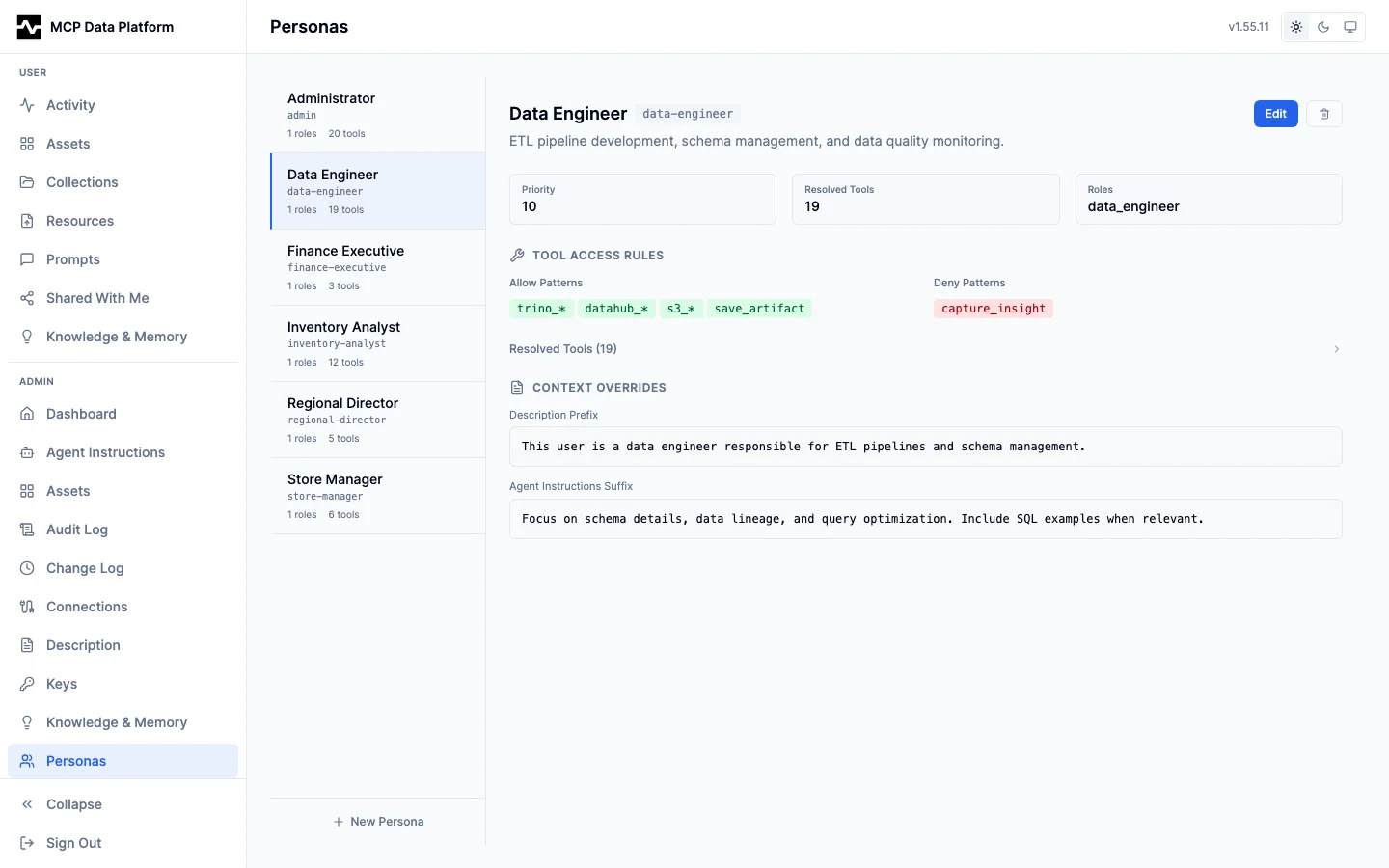
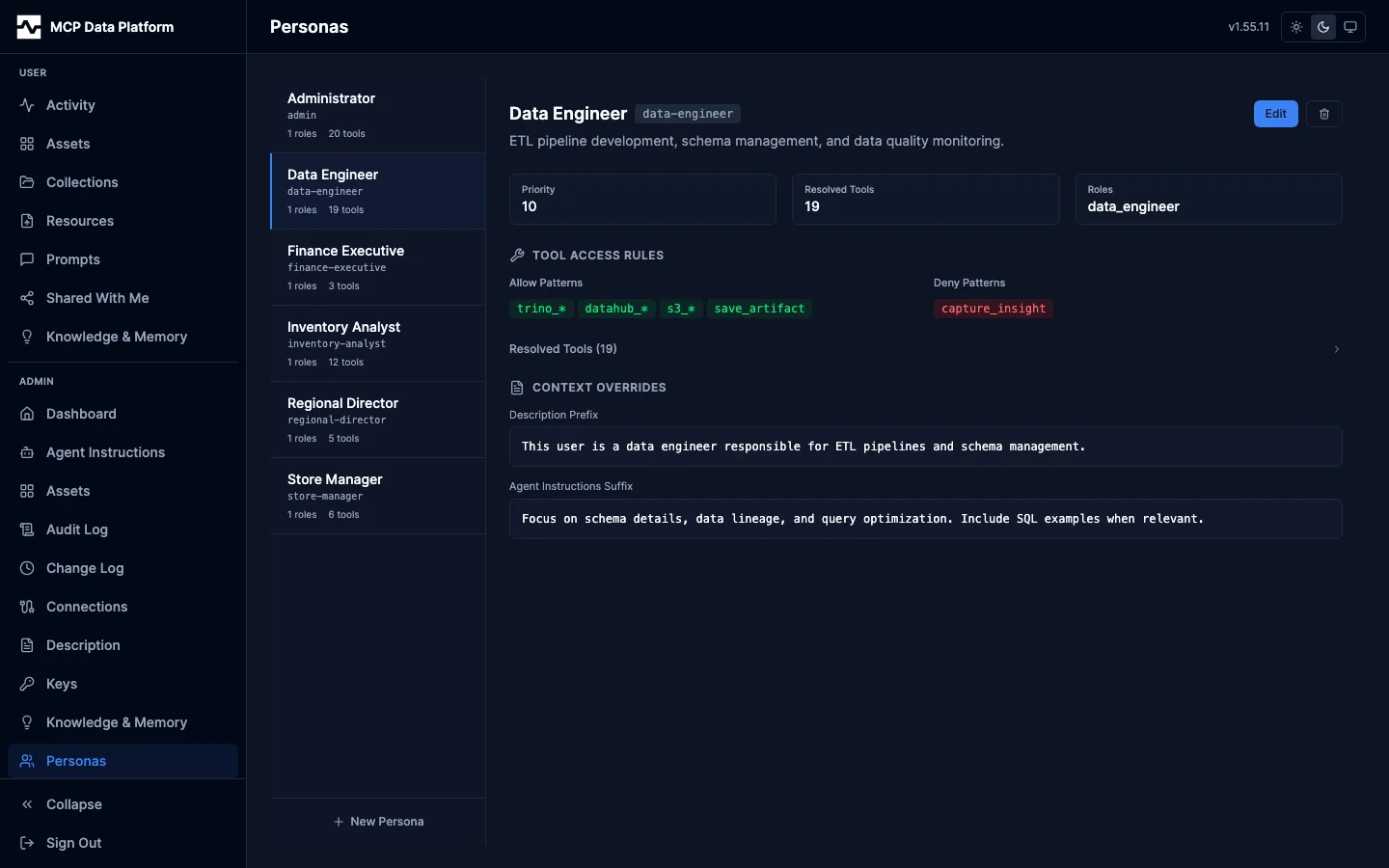
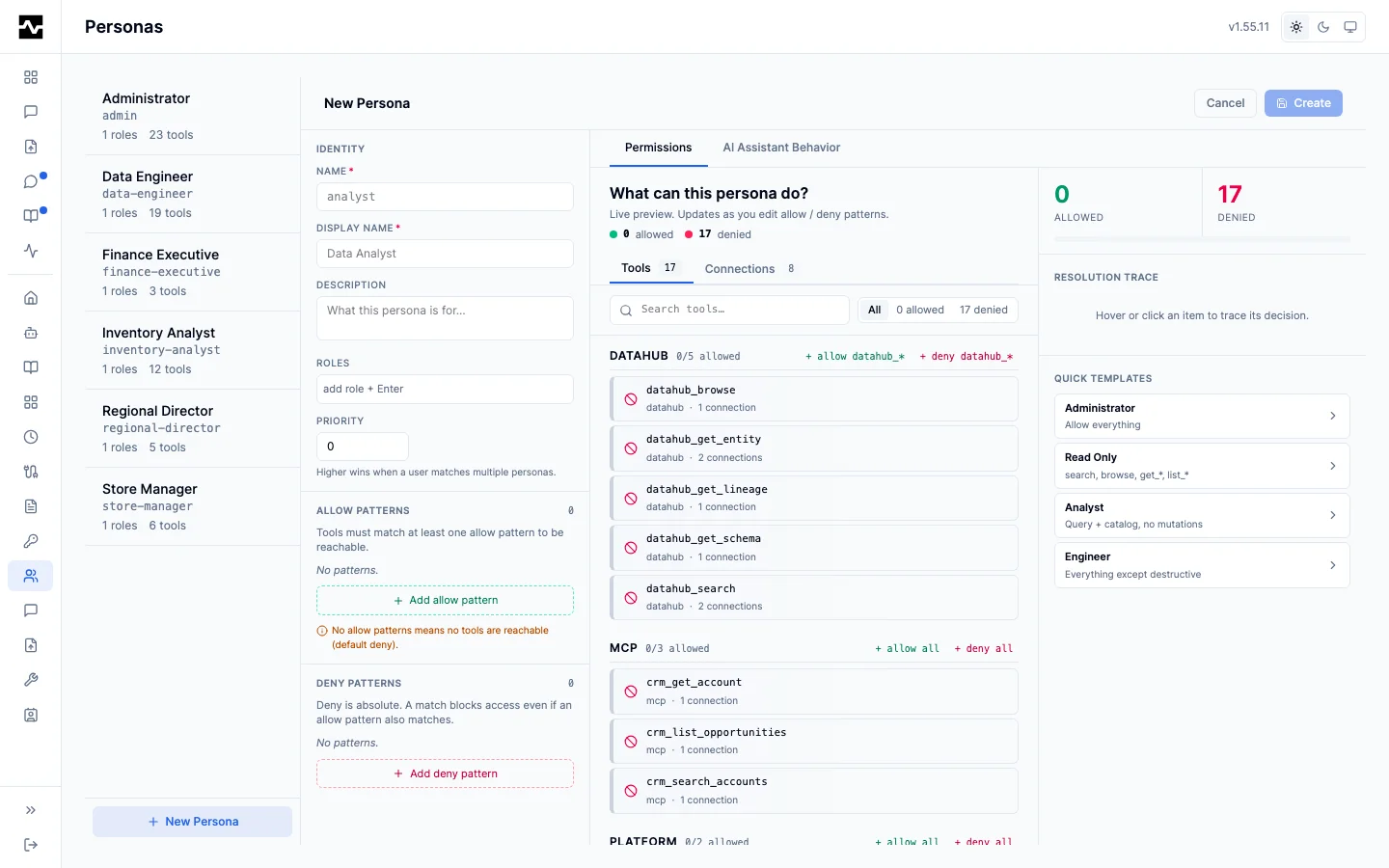
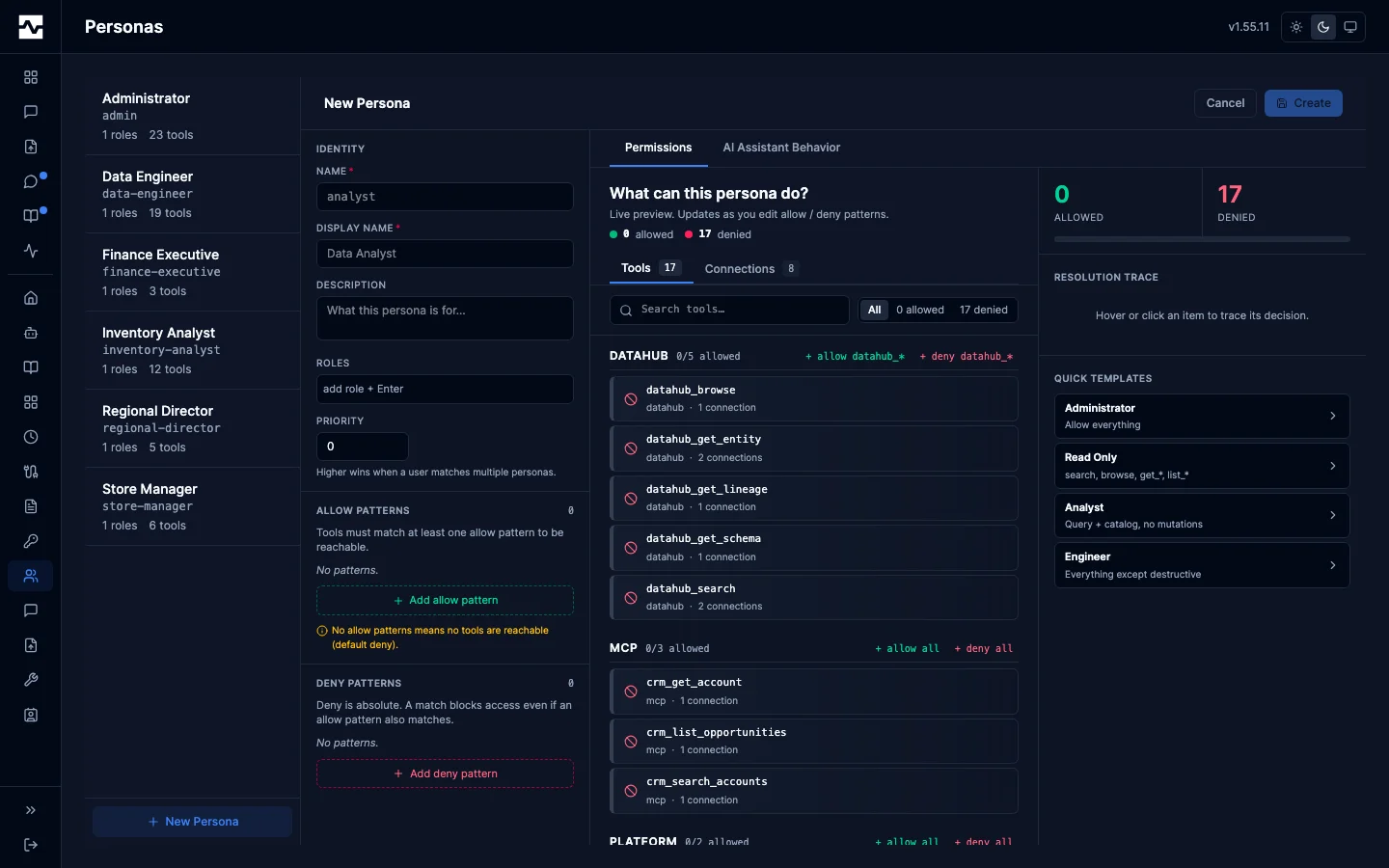
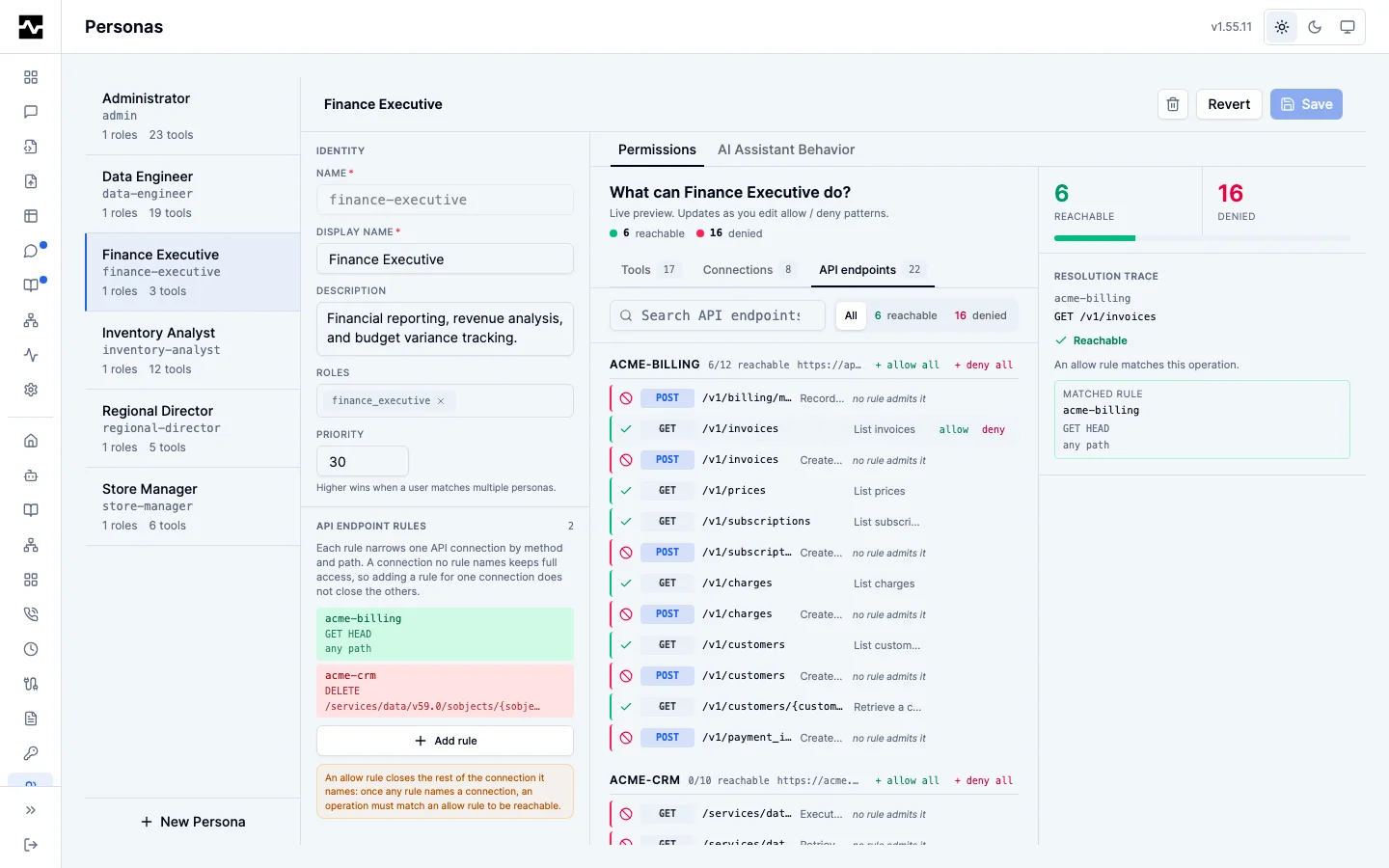
A persona is defined in the YAML below or in the portal under Admin > Personas, and the two produce the same persona. The editor previews what the patterns admit as they are typed, counting the tools, connections and API endpoints each decision allows and denies.
personas:
  analyst:
    display_name: "Data Analyst"
    description: "Read-only access to query and explore data"
    roles: ["analyst", "data_user"]
    tools:
      allow: ["*"]
      deny:
        - "*_delete_*"
    connections:
      allow: ["*"]
    context:
      description_prefix: "You are helping a data analyst explore data."

  admin:
    display_name: "Administrator"
    description: "Full access to all tools"
    roles: ["admin", "platform_admin"]
    tools:
      allow: ["*"]
      deny: []
    connections:
      allow: ["*"]

  viewer:
    display_name: "Viewer"
    description: "Read-only access, no queries"
    roles: ["viewer", "guest"]
    tools:
      allow:
        - "platform_info"
        - "search"
        - "fetch"
        - "datahub_get_*"
        - "s3_list"
      deny:
        - "trino_query"
        - "trino_execute"
        - "s3_object"       # content, metadata and links are one tool
    connections:
      allow: ["*"]
Prefer allow: ["*"] with a targeted deny, as analyst does above. An
enumerated allow-list has to name every tool the persona will ever hold, so it
silently loses each tool a later upgrade adds — the persona keeps working, just
with less of the platform than the operator thinks it has. Enumerate only when
the persona is deliberately confined to a short, fixed list, as viewer is.
Some tools are a unit
A few tools produce work that only another tool can consume. Granting one without the other is a configuration error, not a tightening — the persona can start something it can never finish:
| Granted | Also required | Because |
|---|---|---|
search |
fetch |
search returns navigational pointers carrying a reference; fetch is the only tool that dereferences one. Without it the persona discovers that an answer exists and can never read it, and cannot follow a knowledge page's outbound references at all. |
memory_capture |
search |
search is the retrieval front door for captured memory. Without it the persona writes knowledge that nobody, including itself, can retrieve. |
apply_knowledge |
search |
The review workflow's documented first step is to discover what is already known before applying it. |
The server evaluates these pairs against the tools it actually registered — at startup for every persona, and again on each persona write through the admin API — and logs a warning naming the persona, the missing tool, and the fix:
level=WARN msg="persona grants a capability it cannot complete"
  persona=analyst granted=search missing=fetch
  why="search returns navigational pointers carrying a reference and fetch is the
       only tool that dereferences one, so this persona can discover that an answer
       exists and never read it, ..."
  remedy="add \"fetch\" to persona \"analyst\"'s tools.allow, or remove the
          tools.deny pattern that withholds it"
It is a warning, not a gate: a restricted persona may be exactly what you intended, and startup continues either way. A deployment that never registered the missing tool is never warned about it.
The warning exists because the failure is otherwise invisible. The agent
instructions the platform hands out name a tool only when the caller can reach
it, so a persona missing fetch is simply never told that reading a result in
full is possible. Nothing errors. The only other symptom is an unauthorized
audit row, and only if an agent guesses the tool name unprompted.
The search-first gate needs search
trino_query and trino_execute are refused until search has been called
in the session (see
Search-First Gate Configuration).
A persona granted query tools but not search cannot open that gate and is
refused permanently. Grant search and fetch to every persona that
queries, or turn the gate off with workflow.require_search: false.
No persona means no access
Personas are the access boundary, not a set of preferences applied after the fact. A caller whose roles match no persona is unmapped, and an unmapped caller reaches nothing:
- MCP tool calls resolve to the built-in deny-all persona and are refused.
- The portal answers
403with a branded page telling the person which account was refused and to ask an administrator for access. - The managed-resources API refuses the request.
There is no fallback persona. Granting someone access means granting them a role one of your personas lists — authenticating is not enough. An identity provider will happily issue a token to every account in the directory; those accounts have no roles you granted, so they map to no persona and get in nowhere.
default_persona was removed
Earlier releases accepted personas.default_persona, which assigned that
persona to every caller whose roles matched nothing — including accounts
with no claims at all. A config that still sets it is refused at startup
with an error naming the key. Remove it and list the roles you actually
want to grant on the personas themselves.
Anonymous and no-auth deployments
A deployment running with auth.allow_anonymous: true, or with no
authenticators configured at all, gives its callers the role anonymous. Open
access is therefore something a persona opts into by name:
auth:
  allow_anonymous: true

personas:
  developer:
    display_name: "Developer"
    roles: ["admin", "anonymous"]   # anonymous callers land here
    tools:
      allow: ["*"]
    connections:
      allow: ["*"]
Without a persona listing anonymous, an unidentified caller maps to no persona
and reaches nothing — the same rule as everyone else.
Built-in Personas
The platform includes two built-in personas that can be overridden:
Default Persona:
personas:
  default:
    display_name: "Default User (No Access)"
    roles: []
    tools:
      allow: []
      deny: ["*"]
    connections: {}   # deny-by-default: no connection is reachable
The built-in default persona is deny-all, not allow-all: a user who
matches no configured persona gets no tools. This is fail-closed by design —
unmatched users must be explicitly granted access through a persona rather
than falling back to broad permissions. Define explicit personas (with
matching roles) for every group of users you want to grant tool access to.
Admin Persona:
personas:
  admin:
    display_name: "Administrator"
    roles: ["admin"]
    tools:
      allow: ["*"]
      deny: []
    connections:
      allow: ["*"]
    priority: 100
The built-in admin persona also grants connections.allow: ["*"]. Since
connections are deny-by-default (see below), an admin override that omits
the connections block would reach zero connections despite having
tools.allow: ["*"].
Persona Priority
When a user has roles matching multiple personas, priority determines which one is used:
personas:
  analyst:
    roles: ["analyst"]
    priority: 10

  senior_analyst:
    roles: ["analyst", "senior"]
    priority: 20    # Higher priority wins

  admin:
    roles: ["admin"]
    priority: 100   # Admin always wins if user has admin role
A user with roles ["analyst", "senior"] gets the senior_analyst persona (higher priority).
Context Overrides
Personas can include context overrides that customize the platform description and agent instructions returned by the platform_info tool:
analyst:
  context:
    description_prefix: |
      You are helping a data analyst. Focus on:
      - Data exploration and analysis
      - SQL best practices
      - Statistical insights

    agent_instructions_suffix: |
      When writing SQL:
      - Use meaningful aliases
      - Add comments for complex logic
      - Limit results to avoid overwhelming output
      Always explain query results in business terms.
Override Fields
| Field | Effect |
|---|---|
description_prefix |
Prepended to the platform description |
description_override |
Replaces the platform description entirely |
agent_instructions_suffix |
Appended to the platform agent instructions |
agent_instructions_override |
Replaces the platform agent instructions entirely |
Override fields (description_override, agent_instructions_override) take precedence over prefix/suffix fields. If both a prefix and an override are set, only the override is used.
Connection Access Control
Personas can restrict which toolkit connections a user may access. The boundary applies to both halves of using the platform: a tool call must pass the tool pattern check and the connection check, and the discovery surfaces show only the connections a persona is granted.
personas:
  analyst:
    display_name: "Data Analyst"
    roles: ["analyst"]
    tools:
      allow: ["*"]
    connections:
      allow: ["prod-*"]
      deny: ["prod-admin-*"]

  admin:
    display_name: "Administrator"
    roles: ["admin"]
    tools:
      allow: ["*"]
    connections:
      allow: ["*"]   # required: connections are deny-by-default
The connection is the authorization boundary
This is the platform's authorization design, not a filter layered on top of one. A connection is a named binding to one downstream system under one credential, and several connections may front the same system under different credentials at different permission levels. That is the intended shape: a read-only Trino account and a write-capable one on the same cluster become two connections, and personas are granted one or both. The API gateway uses the same split heavily, with api_routes narrowing a connection further by method and path.
What follows from that:
- The permission level a caller gets is the permission level of the credential bound to the connection they were granted. Tighten access by adding a connection with a narrower downstream account, not by adding a role that lands on the same connection.
- The platform does not impersonate the caller downstream. There is no per-user token exchange and no session-user propagation; everyone granted a connection acts as that connection's credential. Warehouse row policies and column masks that key off the end user therefore do not follow a caller through the platform. Expressing per-person policy means one connection per distinct policy outcome.
- Per-user attribution comes from the audit trail. With audit enabled, each tool call records
user_id,user_email,persona, and the connection it targeted, so the platform can answer who ran what, as which persona, through which connection, even though the downstream system sees only the service account. Audit needs a database and can be switched off, so a deployment relying on connection-scoping should keep it on.
Authorization: the connection is the boundary covers the rationale, the trade against per-user identity passthrough, and when to reach for another connection instead of another role.
How Connection Filtering Works
- When a tool call arrives, the middleware identifies which toolkit connection the tool belongs to
- The user's persona connection rules are evaluated: deny patterns are checked first, then allow patterns
- If the connection is denied (or not allowed), the tool call is rejected
Discovery evaluates the same rules against the same persona, so what a caller can find and what a caller can call cannot disagree.
Connections are deny-by-default, mirroring the tool axis: a persona reaches a connection only when a connections.allow pattern matches its name. If the connections block is omitted or allow is empty, the persona is granted no connections, so every tool call that targets a connection is denied. Grant each persona exactly the connections it needs (the admin persona typically uses allow: ["*"]).
The name a pattern matches is the name a call binds the connection by, which list_connections reports as connection: the instances: key, or the connection_name a DataHub or S3 instance sets in its place. See Connection Names.
What Discovery Shows
The same rules narrow what a persona can see, not only what it can call:
searchomits catalog datasets, connections, and API endpoints that belong to a connection the persona is not granted. A dataset is attributed to a connection through its DataHub platform name; a dataset whose URN maps to no configured connection stays visible, and one reachable through any granted connection stays visible.fetchreturnsfound: falsefor a reference behind a connection the persona is not granted, so a citation cannot read around what search omitted.list_connectionsenumerates only the granted connections.- The portal search applies the same boundary; it shares one router with the
searchtool.
Nothing is dropped silently. Each surface reports what it removed: search adds a withheld count per source in its coverage block plus a withheld_notice naming the persona and the remedy, list_connections returns withheld and notice, and the portal search UI renders the same message above the results. An agent that reads a shortened result set with no explanation concludes the data does not exist and re-derives it; the count turns that into "present, but not yours to see."
This is a metadata boundary. It hides names, descriptions, and inventory across connections; the data behind them was already gated at tools/call.
Pattern Syntax
Connection patterns use the same wildcard syntax as tool patterns:
*matches any sequence of charactersprod-*matchesprod-trino,prod-datahub, etc.*-readonlymatchestrino-readonly,datahub-readonly, etc.
API Endpoint Rules
A persona that reaches an api connection can call every operation that connection exposes. api_routes narrows that to specific HTTP methods and paths, which is how one API is split into read-only and read-write access without two connections and two credentials.
The same rules govern a graphql connection, because a GraphQL operation carries the same three coordinates: the method is the operation kind (QUERY or MUTATION) and the path is the dotted operation id with dots as slashes (/masterData/product/query). See Governing a GraphQL connection below.
personas:
  analyst:
    display_name: "Data Analyst"
    roles: ["analyst"]
    tools:
      allow: ["*"]
    connections:
      allow: ["crm-*"]
    api_routes:
      - connection: "crm-*"
        methods: ["GET", "HEAD"]
      - connection: "crm-*"
        methods: ["DELETE"]
        paths: ["/v1/orders/{id}"]
        action: deny
Each entry has four fields:
| Field | Meaning |
|---|---|
connection |
Glob matched against the connection name. Required. |
methods |
HTTP method globs. Omitted or empty matches any method. Written uppercase; the portal uppercases what you type, because inbound methods are uppercased before matching and the comparison is case-sensitive. |
paths |
Path globs. Omitted or empty matches any path. |
action |
allow (the default) or deny. |
Evaluation, against one (connection, method, path):
- Entries whose
connectionglob does not match are skipped. - Among the rest, a matching
denyentry refuses the call. - Otherwise a matching
allowentry is required. - If no entry names the connection at all, the check is a no-op and the connection-level grant is the sole gate. A persona written before
api_routesexisted behaves exactly as it did.
Step 4 is why api_routes is a narrowing and not a second grant: adding a rule for one connection does not close the others.
Paths are matched in both forms
A path glob is matched against the path the call reaches (/v1/orders/42) and the catalog path the operation declares (/v1/orders/{id}). Naming the declared path is the precise way to govern one operation: paths: ["/v1/orders/{id}"] covers every call that operation serves and touches no other operation. A glob such as /v1/orders/* is a different rule, and it also matches sibling operations at that depth, /v1/orders/summary among them.
Globs use the same wildcard syntax as tool and connection patterns, where * does not cross a /. A path glob therefore governs one segment: /v1/orders/* matches /v1/orders/42 but not /v1/orders/42/items. There is no recursive form — ** is two stars and stops at a separator exactly as one does — so covering a subtree means one rule per depth, or a rule on the connection with no paths at all.
The rules are the same in the portal
api_routes is part of a persona wherever the persona is defined. Settings > Personas > Permissions > API endpoints lists the API connections and, under each, the operations its catalog declares, showing the persona's current decision on each one and the rule that produced it. Selecting an operation to allow or deny writes an entry naming that operation's own method and declared path, so a rule written in the portal and one written in YAML are the same rule.
A rule written as a glob is shown as the glob it was typed as and is not rewritten when the persona is saved. Use the rule editor directly for a pattern no indexed operation corresponds to, such as a path prefix on a connection whose spec has not been loaded yet.
Settings > Personas > Test access answers a (connection, method, path) question against the saved persona and returns the rule that decided it.
Governing a GraphQL connection
A graphql connection is governed by the same entries. Its method is the operation kind and its path is the dotted operation id with dots as slashes, so the coordinates graphql_discover reports on an operation (kind, path) are exactly what a rule names.
A read-only persona on a GraphQL connection is one entry — an allow naming the QUERY method:
An allow, not a deny, for the reason step 3 gives: once any entry names a connection a matching allow is required, so a mutation is refused by matching none, while a deny on its own would close the connection to every method rather than to mutations. Adding the deny beside it states the intent and is what the refusal names.
Naming no paths is what makes the entry cover every operation. A path glob would not: * does not cross a / and there is no recursive form, so a glob covers one depth. Name paths to scope further, one rule per depth as everywhere else:
A document is reduced to the operations it invokes rather than to its root fields, so { masterData { product { read(_id: "1") { _id } } } } is authorized as QUERY /masterData/product/read and a rule can name an entity's verb rather than only a whole package. Aliases are resolved to the underlying field name and fragments are expanded, so a denied operation cannot be reached by renaming it or hiding it in a fragment. Every operation a document invokes must pass: a mixed document is refused when any one of them is denied, rather than being sent with the denied part stripped.
A connection-level read_only: true refuses mutations for every persona, which is what an operator sets once when an endpoint is mounted for reporting rather than writing the same deny entry into every persona.
What this does not do
api_routes does not make an API connection deny-by-default. A connection no rule names stays fully reachable by any persona granted that connection, which is the connection boundary doing its job. To hide a subset of an API from a persona entirely, either write an allow rule for the operations it should reach (which makes everything else on that connection unreachable, per step 3) or bind the narrower access to its own connection.
Knowledge Tool Access
The knowledge capture tools follow the same allow/deny patterns. Control who can capture insights and who can apply them:
personas:
  analyst:
    display_name: "Data Analyst"
    roles: ["analyst"]
    tools:
      allow: ["*"]                # includes search, fetch, memory_capture
      deny:
        - "apply_knowledge"       # Cannot apply changes
    connections:
      allow: ["*"]

  admin:
    display_name: "Administrator"
    roles: ["admin"]
    tools:
      allow: ["*"]                # Full access including apply_knowledge
    connections:
      allow: ["*"]

  etl_service:
    display_name: "ETL Service"
    roles: ["service"]
    tools:
      allow:
        - "platform_info"
        - "search"                # required: the search-first gate refuses
        - "fetch"                 #   trino_query until search has been called
        - "trino_*"
      deny:
        - "memory_capture"        # Automated processes should not capture
        - "apply_knowledge"
    connections:
      allow: ["*"]
etl_service shows the enumerated form done correctly: it withholds the
knowledge-write tools, which is a narrowing, while keeping search and fetch,
without which it could not run a query at all.
See Knowledge Capture for the full feature documentation.
Example: Data Mesh Personas
personas:
  sales_analyst:
    display_name: "Sales Domain Analyst"
    roles: ["sales_team"]
    tools:
      allow: ["*"]
      deny: []
    connections:
      allow: ["*"]
    context:
      description_prefix: |
        You are helping a sales analyst.
        Focus on: revenue metrics, customer data, order patterns.
      agent_instructions_suffix: "Query the hive.sales schema for sales data."

  marketing_analyst:
    display_name: "Marketing Domain Analyst"
    roles: ["marketing_team"]
    tools:
      allow: ["*"]
      deny: []
    connections:
      allow: ["*"]
    context:
      description_prefix: |
        You are helping a marketing analyst.
        Focus on: campaign metrics, customer segments, attribution.
      agent_instructions_suffix: "Query the hive.marketing schema for marketing data."
Next Steps
- Tool Filtering - Allow/deny pattern syntax
- Role Mapping - Map OIDC roles to personas