Admin API
The Admin REST API provides HTTP endpoints for managing the platform outside the MCP protocol. All endpoints are mounted under a configurable path prefix (default: /api/v1/admin).
Authentication
All admin endpoints require authentication. Pass credentials as either:
X-API-Key: <key>headerAuthorization: Bearer <token>header
The authenticated user must resolve to the configured admin persona (set via admin.persona in config). Requests without valid credentials receive 401 Unauthorized. Authenticated users whose persona does not match the admin persona receive 401 Unauthorized (the admin API is invisible to non-admin users by design).
Interactive API Documentation (Swagger UI)
When the admin API is enabled, an interactive Swagger UI is served at:
The OpenAPI specification is auto-generated from source code annotations using swaggo/swag. The raw spec is available at /api/v1/admin/docs/doc.json. To regenerate after code changes:
Configuration
portal:
  enabled: true               # Enable portal SPA + API
  title: "ACME Data Platform" # Sidebar/branding title
  logo: https://example.com/logo.svg
  logo_light: https://example.com/logo-for-light-bg.svg
  logo_dark: https://example.com/logo-for-dark-bg.svg

admin:
  enabled: true
  persona: admin              # Persona required for admin access
  path_prefix: /api/v1/admin  # URL prefix for all admin endpoints
Admin configuration:
| Field | Type | Default | Description |
|---|---|---|---|
admin.enabled |
bool | false |
Enable admin REST API |
admin.persona |
string | admin |
Persona required for admin access |
admin.path_prefix |
string | /api/v1/admin |
URL prefix for admin endpoints |
Portal/branding configuration:
| Field | Type | Default | Description |
|---|---|---|---|
portal.enabled |
bool | false |
Enable portal SPA + API |
portal.title |
string | MCP Data Platform |
Sidebar/branding title text |
portal.logo |
string | "" |
Logo URL (fallback for both themes) |
portal.logo_light |
string | "" |
Logo URL for light theme |
portal.logo_dark |
string | "" |
Logo URL for dark theme |
Admin Portal
When portal.enabled: true, an interactive web dashboard is served at /portal/. The portal provides:
- Dashboard: Real-time platform health with activity timelines, top tools/users, performance percentiles, and error monitoring
- Tools: Connection overview, tool inventory with descriptions, and interactive tool execution with semantic enrichment display
- Audit Log: Searchable event log with detail drawer showing full request metadata and parameters
- Knowledge: Insight statistics, governance workflow with approve/reject actions, and changeset tracking
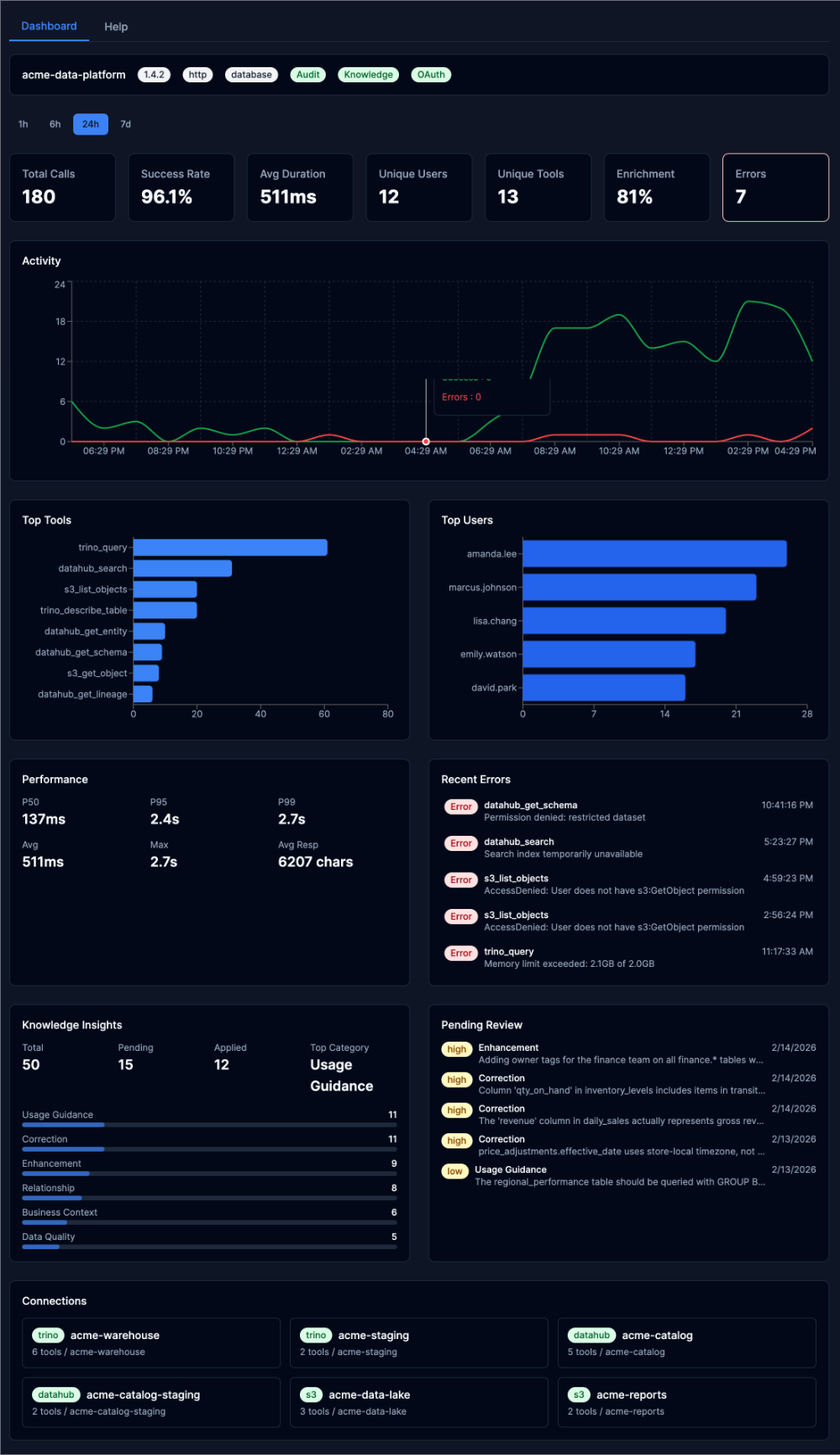
The portal requires authentication — access it with the same credentials used for admin API requests. In production builds, the service worker (mockServiceWorker.js) is stripped automatically.
See the Admin Portal guide for a complete visual walkthrough.
Error Format
All errors follow RFC 9457 Problem Details:
{
  "type": "about:blank",
  "title": "Conflict",
  "status": 409,
  "detail": "knowledge is enabled but not available without database configuration"
}
Operating Mode Behavior
Some endpoints are only available in certain operating modes. When a feature is enabled in config but unavailable at runtime (e.g., no database), endpoints return 409 Conflict with an explanation. When a feature is disabled in config, endpoints return 404 Not Found.
| Endpoint Group | Standalone (no DB) | File + DB | Bootstrap + DB Config |
|---|---|---|---|
| System | available | available | available |
| Config (read) | available | available | available |
| Config (write) | 409 | 409 | available |
| Personas (read) | available | available | available |
| Personas (write) | 409 | 409 | available |
| Auth keys (read) | available | available | available |
| Auth keys (write) | 409 | 409 | available |
| Audit | 409 (if enabled) | available | available |
| Knowledge | 409 (if enabled) | available | available |
System Endpoints
Get System Info
Returns platform identity, version, runtime feature availability, and config mode.
Response:
{
  "name": "mcp-data-platform",
  "version": "0.17.0",
  "description": "Semantic data platform",
  "transport": "http",
  "config_mode": "file",
  "portal_title": "ACME Data Platform",
  "portal_logo": "https://example.com/logo.svg",
  "portal_logo_light": "https://example.com/logo-for-light-bg.svg",
  "portal_logo_dark": "https://example.com/logo-for-dark-bg.svg",
  "features": {
    "audit": true,
    "oauth": false,
    "knowledge": true,
    "admin": true,
    "database": true
  },
  "toolkit_count": 3,
  "persona_count": 2
}
Feature booleans reflect runtime availability, not config values. For example, knowledge is false when enabled in config but no database is configured.
List Tools
Returns all registered tools across all toolkits.
Response:
{
  "tools": [
    {
      "name": "trino_query",
      "toolkit": "prod",
      "kind": "trino",
      "connection": "prod-trino"
    }
  ],
  "total": 1
}
List Connections
Returns all toolkit connections with their tools.
Response:
{
  "connections": [
    {
      "kind": "trino",
      "name": "prod",
      "connection": "prod-trino",
      "tools": ["trino_query", "trino_describe_table"]
    }
  ],
  "total": 1
}
Config Endpoints
Get Config
Returns the current configuration as JSON with sensitive values redacted.
Get Config Mode
Returns the current config store mode.
Response:
Export Config
Returns the current configuration as downloadable YAML. Sensitive values are redacted by default.
Query Parameters:
| Parameter | Type | Description |
|---|---|---|
secrets |
string | Set to true to include sensitive values |
Import Config
Imports a YAML configuration into the config store. Only available in database config mode. Returns 409 Conflict in file mode.
Query Parameters:
| Parameter | Type | Description |
|---|---|---|
comment |
string | Optional revision comment |
Request Body: YAML configuration (Content-Type: application/x-yaml or text/plain). Max 1MB.
Response:
Config History
Returns config revision history. Only available in database config mode.
Response:
{
  "revisions": [
    {
      "version": 3,
      "author": "[email protected]",
      "comment": "update persona definitions",
      "created_at": "2025-01-15T14:30:00Z"
    }
  ],
  "total": 3
}
Persona Endpoints
List Personas
Returns all configured personas with tool counts.
Response:
{
  "personas": [
    {
      "name": "analyst",
      "display_name": "Data Analyst",
      "description": "Read-only data access",
      "roles": ["analyst"],
      "tool_count": 15
    }
  ],
  "total": 1
}
Get Persona
Returns a single persona with resolved tool list.
Response:
{
  "name": "analyst",
  "display_name": "Data Analyst",
  "description": "Read-only data access",
  "roles": ["analyst"],
  "priority": 0,
  "allow_tools": ["trino_*", "datahub_*"],
  "deny_tools": ["*_delete_*"],
  "tools": ["trino_query", "trino_describe_table", "datahub_search"]
}
Create Persona
Creates a new persona. Only available in database config mode.
Request Body:
{
  "name": "viewer",
  "display_name": "Data Viewer",
  "description": "Read-only access to DataHub",
  "roles": ["viewer"],
  "allow_tools": ["datahub_*"],
  "deny_tools": []
}
| Field | Type | Required | Description |
|---|---|---|---|
name |
string | yes | Unique identifier |
display_name |
string | yes | Human-readable name |
description |
string | no | Description |
roles |
array | no | Roles that map to this persona |
allow_tools |
array | no | Tool allow patterns |
deny_tools |
array | no | Tool deny patterns |
priority |
int | no | Resolution priority (higher wins) |
Status Codes: 201 Created, 400 Bad Request, 409 Conflict (name exists or file mode)
Update Persona
Updates an existing persona. Only available in database config mode.
Request Body: Same as Create (except name is taken from the URL path).
Status Codes: 200 OK, 400 Bad Request
Delete Persona
Deletes a persona. Only available in database config mode. Cannot delete the admin persona.
Status Codes: 200 OK, 404 Not Found, 409 Conflict (admin persona)
Auth Key Endpoints
List Auth Keys
Returns all API keys (key values are never exposed, only names and roles).
Response:
{
  "keys": [
    {
      "name": "admin",
      "roles": ["admin"],
      "created_at": "2025-01-01T00:00:00Z"
    }
  ],
  "total": 1
}
Create Auth Key
Generates a new API key. Only available in database config mode. The key value is returned only once.
Request Body:
Response:
{
  "name": "ci-pipeline",
  "key": "mdp_a1b2c3d4e5f6...",
  "roles": ["analyst"],
  "warning": "Store this key securely. It will not be shown again."
}
Status Codes: 201 Created, 400 Bad Request, 409 Conflict (name exists or file mode)
Delete Auth Key
Deletes an API key. Only available in database config mode.
Status Codes: 200 OK, 404 Not Found
Audit Endpoints
Audit endpoints require audit.enabled: true and a configured database. Without a database, endpoints return 409 Conflict. See Audit Logging for the audit system overview.
List Audit Events
Returns paginated audit events with optional filtering.
Query Parameters:
| Parameter | Type | Description |
|---|---|---|
user_id |
string | Filter by user ID |
tool_name |
string | Filter by tool name |
session_id |
string | Filter by MCP session ID |
success |
boolean | Filter by success/failure |
start_time |
RFC 3339 | Events after this time |
end_time |
RFC 3339 | Events before this time |
page |
integer | Page number, 1-based (default: 1) |
per_page |
integer | Results per page (default: 50) |
Get Audit Event
Returns a single audit event by ID.
Get Audit Stats
Returns aggregate counts for total, successful, and failed events. Supports the same time and filter parameters as list.
Response:
Audit Metrics: Overview
Returns aggregated audit metrics including tool, user, and toolkit breakdowns, timeseries data, and performance statistics.
Query Parameters:
| Parameter | Type | Description |
|---|---|---|
start_time |
RFC 3339 | Start of time range |
end_time |
RFC 3339 | End of time range |
Audit Metrics: Enrichment
Returns enrichment statistics: how often enrichment is applied, which modes are used, and token savings from deduplication.
Query Parameters:
| Parameter | Type | Description |
|---|---|---|
start_time |
RFC 3339 | Start of time range |
end_time |
RFC 3339 | End of time range |
Response:
{
  "total_calls": 1500,
  "enriched_calls": 1200,
  "enrichment_rate": 0.80,
  "full_count": 800,
  "summary_count": 300,
  "reference_count": 100,
  "none_count": 0,
  "total_tokens_full": 450000,
  "total_tokens_dedup": 120000,
  "tokens_saved": 330000,
  "avg_tokens_full": 375.0,
  "avg_tokens_dedup": 100.0,
  "unique_sessions": 45
}
| Field | Type | Description |
|---|---|---|
total_calls |
int | Total tool calls in the time range |
enriched_calls |
int | Calls where enrichment was applied |
enrichment_rate |
float | Fraction of calls that were enriched (0.0–1.0) |
full_count |
int | Calls using full enrichment mode |
summary_count |
int | Calls using summary dedup mode |
reference_count |
int | Calls using reference dedup mode |
none_count |
int | Calls using none dedup mode |
total_tokens_full |
int64 | Sum of full enrichment tokens |
total_tokens_dedup |
int64 | Sum of dedup enrichment tokens |
tokens_saved |
int64 | Estimated tokens saved by deduplication |
avg_tokens_full |
float | Average tokens per full enrichment |
avg_tokens_dedup |
float | Average tokens per dedup enrichment |
unique_sessions |
int | Distinct sessions in the time range |
Audit Metrics: Discovery Patterns
Returns session-level discovery patterns: how often users explore the catalog (DataHub) before querying (Trino), and which discovery tools are most popular.
Query Parameters:
| Parameter | Type | Description |
|---|---|---|
start_time |
RFC 3339 | Start of time range |
end_time |
RFC 3339 | End of time range |
Response:
{
  "total_sessions": 100,
  "discovery_sessions": 75,
  "query_sessions": 80,
  "discovery_before_query": 60,
  "discovery_rate": 0.75,
  "query_without_discovery": 20,
  "top_discovery_tools": [
    {"name": "datahub_search", "count": 150},
    {"name": "datahub_get_schema", "count": 90}
  ]
}
| Field | Type | Description |
|---|---|---|
total_sessions |
int | Total sessions in the time range |
discovery_sessions |
int | Sessions that used DataHub tools |
query_sessions |
int | Sessions that used Trino tools |
discovery_before_query |
int | Sessions where DataHub was used before Trino |
discovery_rate |
float | Fraction of sessions that used discovery (0.0–1.0) |
query_without_discovery |
int | Sessions that queried Trino without using DataHub first |
top_discovery_tools |
array | Most-used discovery tools, sorted by count |
Knowledge Endpoints
Knowledge endpoints require knowledge.enabled: true and a configured database. Without a database, endpoints return 409 Conflict. For the full knowledge API reference, see Knowledge Admin API.
Endpoint summary:
| Method | Path | Description |
|---|---|---|
GET |
/knowledge/insights |
List insights with filtering |
GET |
/knowledge/insights/stats |
Insight statistics |
GET |
/knowledge/insights/{id} |
Get single insight |
PUT |
/knowledge/insights/{id} |
Update insight text/category |
PUT |
/knowledge/insights/{id}/status |
Approve or reject |
GET |
/knowledge/changesets |
List changesets |
GET |
/knowledge/changesets/{id} |
Get single changeset |
POST |
/knowledge/changesets/{id}/rollback |
Rollback changes |